English
Changelog
Releases, improvements, and updates to DirectPort.
Release 34
17.09.2026 ReleaseFeatures
Payments and Invoice Matching
Financial > Payments records payments that have already been made and links them to invoices. Drop a bank or accounting export into the upload area, and DirectPort reads it against the company you have selected, sets aside the rows that are not payments, and prepares a review.
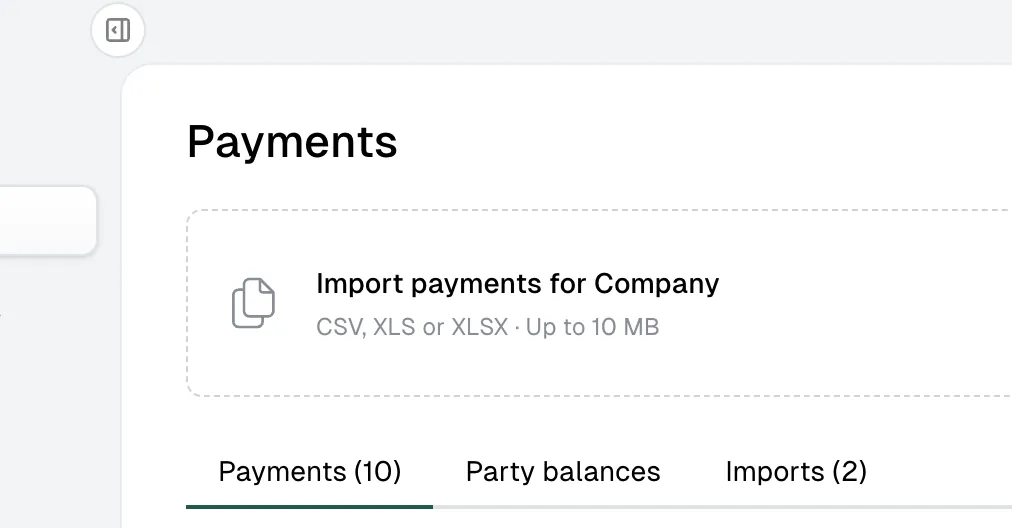
Nothing is recorded until you confirm. The review sorts what it found into Matched, Needs attention, All and Duplicates, and explains per payment which references, direction and currency led to its suggested invoice. Add or change a match yourself, split one payment over several invoices, or allocate part of it and leave the rest unallocated. A payment that belongs to no invoice can be imported on its own.
Confirming the import applies the allocations to the invoice balances. The Payments tab then lists what was recorded, with the source file and row behind each line. An invoice with linked payments shows the allocated amount, its date and the bank. The Imports tab keeps every uploaded file, its status and a download of the original.
Party balances answers what a party still owes you, or you still owe them. Receivable, payable and saldo are listed per party and per currency, and selecting a party shows the invoices and credit notes behind the figure.
Read the payments and invoice matching guide.
Equipment Incidents on the Planner
Equipment breakdowns are now visible on the planner itself. The create button offers Create event and Record equipment incident, and the incident form asks for the terminal first so the equipment list stays limited to that terminal. The terminal selected in the planner is filled in for you.
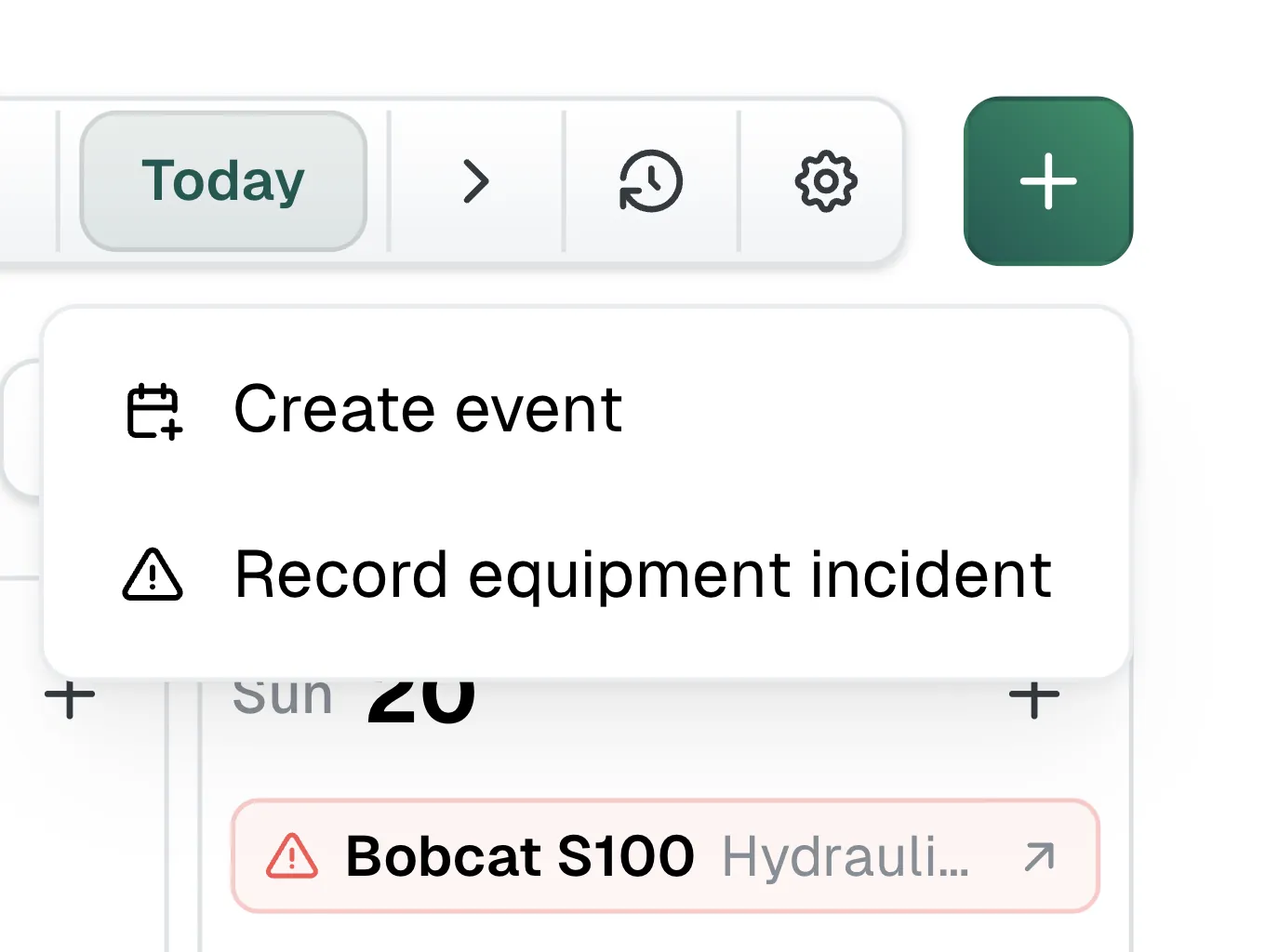
An incident appears on the day it started, above the operations of the terminals in view. Ongoing incidents are marked red and closed ones grey, and the row names the item and what happened. Selecting one opens that item's Incidents tab.
On a phone the planner's filters moved behind a Filters button. It opens the terminals, search, member and tracked storage group in a drawer, and counts how many of them are narrowing the calendar.
Vessel Overview Rebuilt
The cards on a vessel page were rebuilt on one shared layout, so Details, Tracking, Certificates, Last Cargos, Bunker Events and Compartments all read the same way.
The tracking status sits on the map instead of beside it. It says whether the vessel is moving or stationary, where it is, and when its last position came in. A reading that has gone stale is marked.
Certificates opens with a bar that splits the vessel's certificates into expired, expiring soon, valid and without an end date, with a count per state. The list underneath is ordered by urgency, and each certificate says how long it has left or how long ago it ran out.
Last Cargos is a list of tiles rather than a table. A tile carries the product, how far back the cargo is, the bill of lading date and how long ago that was. Tiles that have a voyage open it.
Bunker Events summarises the vessel's fuel in its header: how much of each fuel type is on board according to the most recent reading, and when the vessel was last bunkered.
Financial Inbox Priority
The split between Priority and Other in the financial inbox now follows what was read from the document. A document is Priority when it was uploaded by hand, when extraction found a seller, a buyer or a total, or when it has already been approved, declined or put on hold. Everything else sits in Other.
Email Detail View
Selecting an email in Administration > Emails opens it on its own page. It shows the message and its addresses, the processing status and any error, the email content, and the attachments with their file type and size. Attachments and the original email can be downloaded. Emails carrying financial documents are listed only for users with access to the Financial module.
Storage Units Across Terminals
Terminals > Storage units has a This terminal and All terminals switch. The all-terminals view adds a Terminal column, so units with the same label can be told apart.
Fixes
- Certificate expiry counts whole calendar days, so a certificate running out tomorrow is no longer reported as expired today.
- Equipment items keep the open tab in the address bar, so a link opens on that tab and the back button returns to the previous one.
- Equipment documents can be uploaded up to 100 MB.
- Peppol VAT breakdowns are calculated with decimal arithmetic, so the rounded totals match the invoice.
- A Peppol invoice between two of your own companies no longer appears on the sending company's side of the financial inbox.
- Generated documents download with the file extension their format expects.
- Attachment file types are normalised before AI document processing, so a file with an unusual type is still read.
- The dashboard's ETA against ATA figure averages the arrivals inside the selected period and ignores differences of more than 30 days.
- Recent activity on the dashboard shows a loading state instead of an empty panel.
Release 33
20.08.2026 ReleaseFeatures
Equipment Management
Equipment has moved from a terminal-only list into its own workspace. Open Equipment to see every terminal item, vessel item and unassigned item together. The Items view keeps parent and child equipment in a tree and shows assignment, availability, condition and open-work counts. Search the list or filter it by owner, status and type.
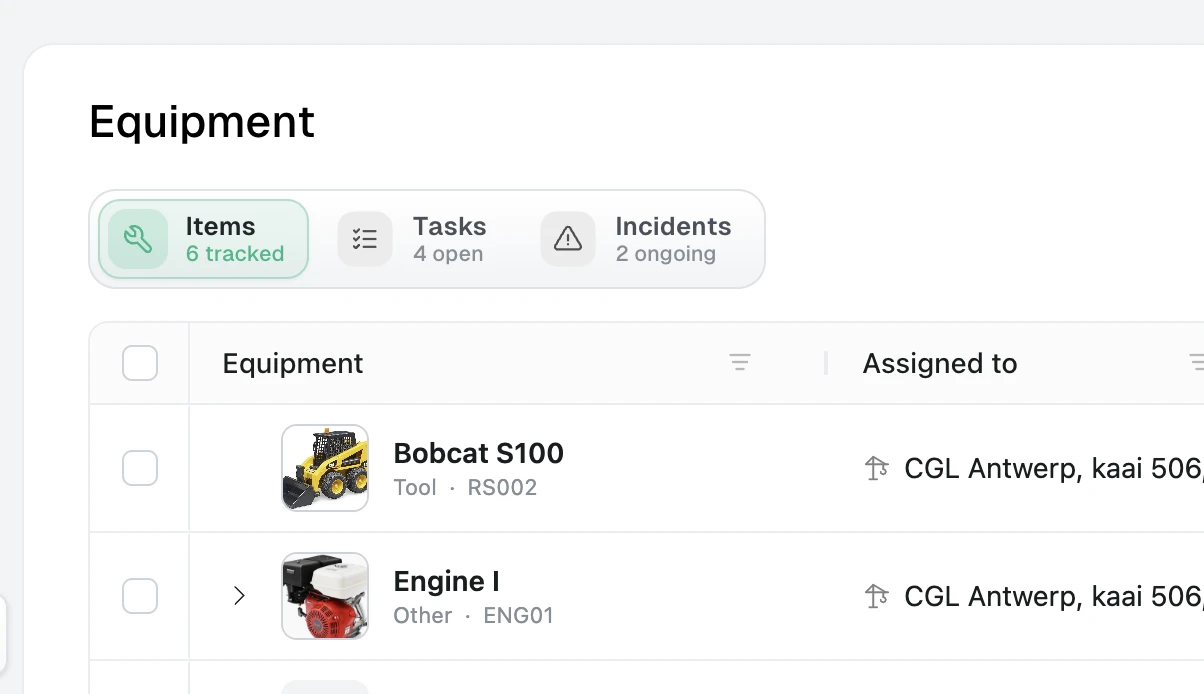
Each item now has a full record with an identifying photo, code, brand, model, serial number and description. Its overview brings together documents, contacts, comments and a timeline of important changes. Work can be managed from the item or from the module-wide Tasks and Incidents views: assign tasks with priority and due dates, see overdue work, attach files to incidents, and keep ongoing events separate from resolved history.
Existing terminal equipment remains available in the new module and can now be reassigned to a terminal, a vessel, or left unassigned.
Read the equipment management guide.
Multiple Bank Accounts for Invoicing
Parties can now carry several labeled bank accounts under Master Data > Parties. The first account becomes primary, and another can be marked primary at any time. Existing IBAN and BIC details are migrated into a primary account.
Outgoing and self-billed invoices have a Payment accounts selector that accepts one or more accounts. DirectPort starts with the seller's primary account, or the customer-specific defaults when they have been saved. Adjust the selection for the invoice and enable Make selected accounts default for this customer when the same accounts should be selected for that seller and customer next time.
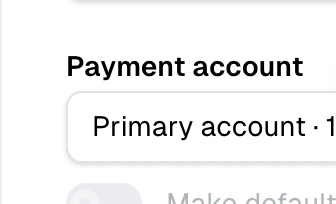
The label, IBAN and BIC of every selected account are saved with the invoice. The accounts are listed in the footer of the invoice document, and each account with an IBAN is included as a payment option in Peppol. This snapshot keeps an existing invoice stable when an account is later edited or deleted, and credit notes retain the original invoice's payment details.
Read the bank accounts and invoicing guide.
Fixes
- Contacts can be saved without an email address, which supports phone-only equipment and party contacts.
- Document and incident attachments now surface upload failures correctly, and equipment document views no longer start an unrelated voyage lookup.
Release 32
06.08.2026 ReleaseFeatures
Live Voyage Map
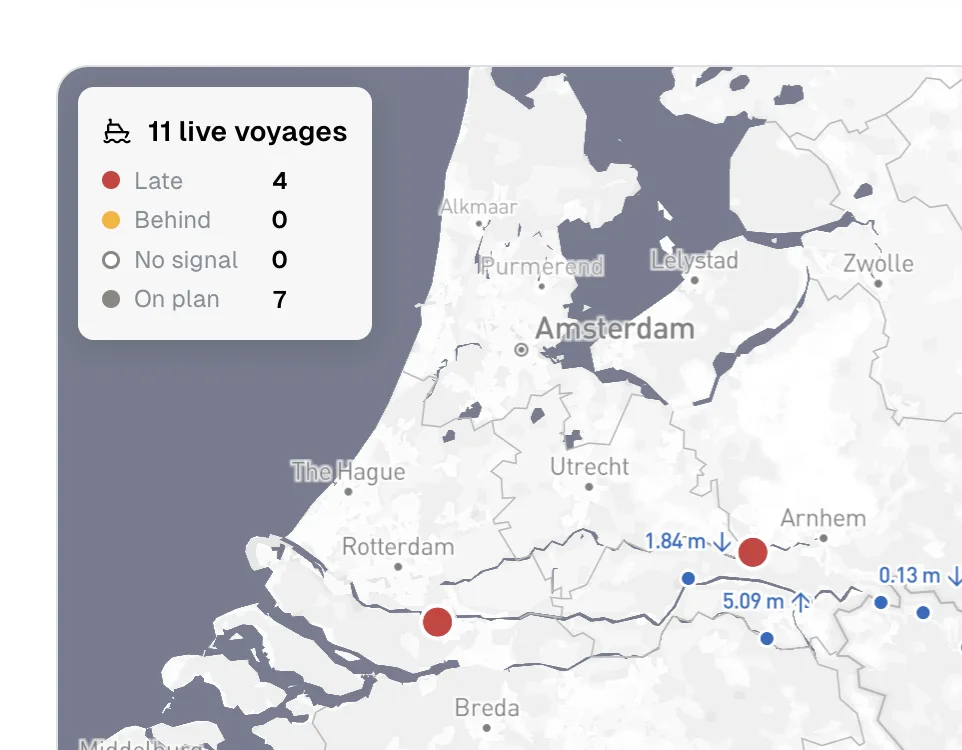
The Live Voyages card on the dashboard now opens on a map. Every trackable active voyage sits at its last known position, and the legend counts the fleet by schedule state: On plan, Behind, Late and No signal. Behind means the next stop's ETA has passed, late means it passed more than a day ago, and no signal means nothing has come in from the vessel for twelve hours. Positions refresh every minute.
Select a vessel to draw its route and the stops of that voyage. Zoomed out, vessels group into clusters that take the colour of their worst member, so a delay stays visible at fleet level. Water level gauges near the fleet are drawn with their reading and a trend arrow. Kaub and the other gauges inland operators watch are picked first. Switch to List for the card view you had before.
Time Charter Cycles
Voyages billed at a daily rate now carry a full charter cycle, measured empty to empty. The cycle runs from the moment discharge finished on the barge's previous voyage to the same moment on this one, so the ballast leg and the waiting in between are counted where they belong.
Open the Time Charter accordion under a voyage's Financial tab for hire, gasoil, cycle cost, income and margin, with off-hire from vessel schedule events already deducted. The cycle is also split into four buckets: sailing loaded, sailing empty, waiting loaded and waiting empty. Time that cannot be classified because a stop has no arrival is shown separately in grey instead of being pushed into one of the four.

Every cycle carries a status. When a value was inferred, the panel says which one and gives you a date field for each missing timestamp. The figures recalculate as soon as you save. Voyages on a daily rate are marked with a blue TC badge in the voyages list, and Voyage Insights has a new Time Charter section with performance per charter for the selected period, the same four-bucket split, and the individual cycles behind each row.
Voyage Bunkering Rebuilt
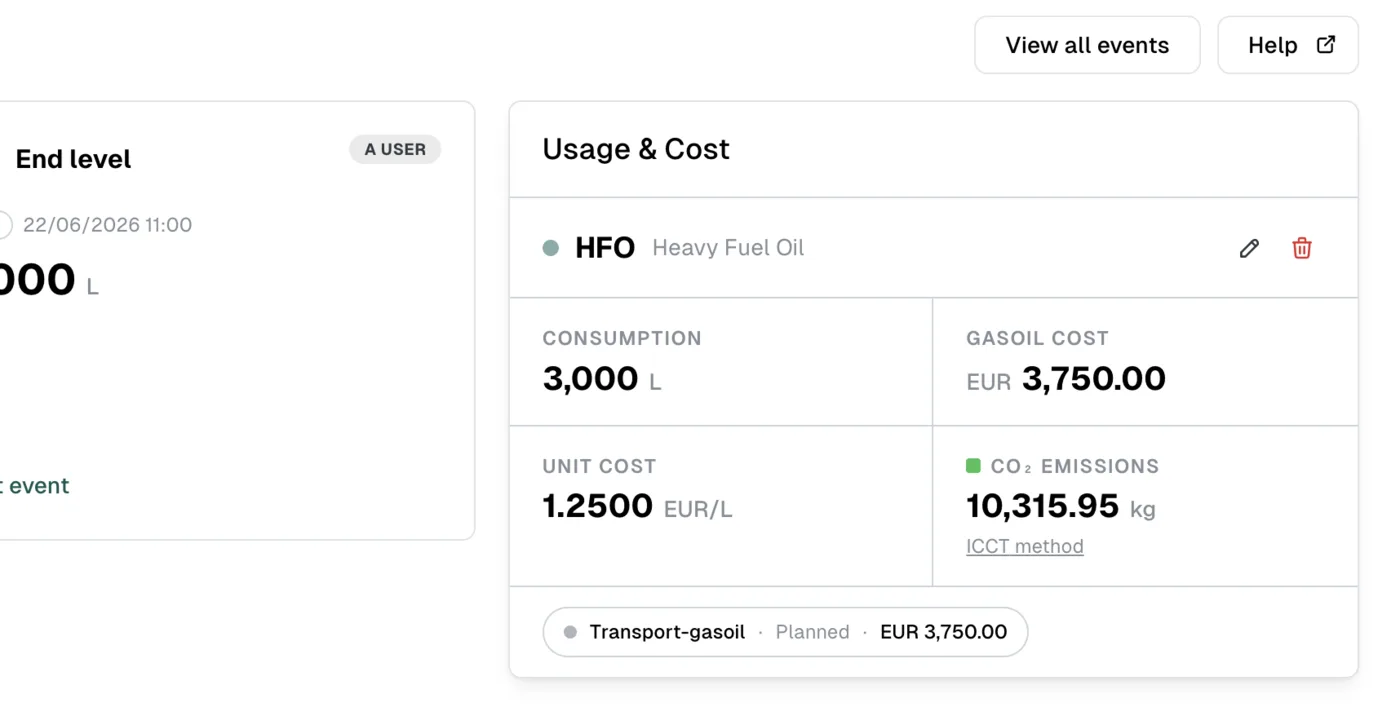
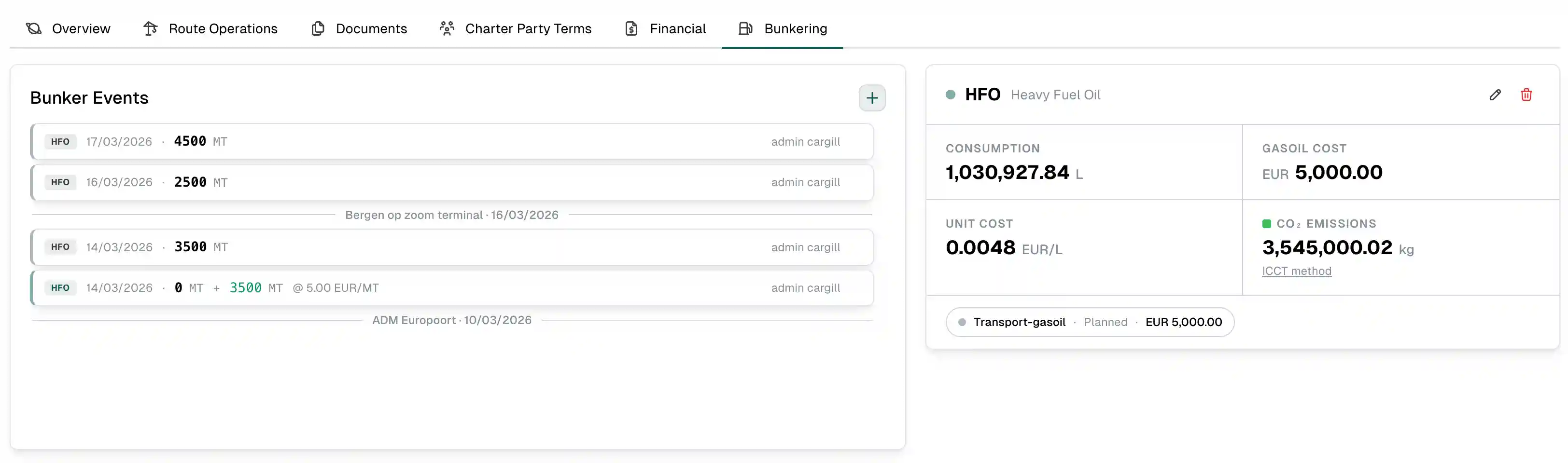
The voyage Bunkering section now shows the events its calculation is built on. Last bunkering, Start level and End level each get a card with the selected event, when it was recorded and who recorded it, next to the Usage & Cost result. Use Edit event to correct a source in place. When a source is missing, its card says what is needed and its action opens the right form with the voyage's time and location filled in.
View all events opens the vessel's complete bunker history, where voyage stop markers separate the events by port call. The saved summary shows consumption, cost, unit cost and CO2 emissions with the method behind the emission figure.
Fuel Reporting
The dashboard's Gasoil Prices tab is now Bunkering and carries the market prices plus what the fleet actually burned. Fuel bunkered, bunker spend, voyage fuel used and voyage fuel cost sit at the top, with a bunker activity log and a per-voyage fuel usage view underneath. Filter by vessel or fuel type, and export both tables in one file.
The Emissions tab was reworked the same way. It has 30-day, quarter, year-to-date and 12-month periods next to the custom date range, a breakdown of emissions per fuel, and its own export.
Route-aware Low Water Setup
The low water clause setup now works from the voyage's own route. Gauges along that route are listed under Gauges on this voyage, so the passage start and end gauge are picked from the stations the barge actually passes rather than from the full list. Region templates fill in a common setup in one step, every gauge shows its history and forecast, and all other stations stay searchable.
Terminal Planner
Terminals now opens on the Planner. The operations widget on the module overview has been removed, since the planner covers the same ground in more detail.
Public planner links can be protected with an access code. Set the code in tenant settings, and anyone opening the link is asked for it before the plan loads. Operations gained Sweeping and Bobcat flags next to Cleaning, both shown on the card and on the public view. The planner header shows the most recent change when there was one in the last six hours, and the activity drawer is searchable.
The operation types list now shows cargo, weight calculation, linked documents, forms and features as columns, so the setup of every type can be reviewed without opening them one by one.
Voyage Insights Comparisons
The Vessel Performance, Provider Performance and Region Map panels let you pick which entities to chart and compare them against the fleet average. The two cargo type graphs were replaced by a cargo performance table and a monthly cargo graph. Panels are grouped under Cargo, Fleet & Partners, Time Charter, Regions & Footprint and Profit & Loss, and the filters at the top still apply to all of them.
Tracking History Playback
The voyage tracking history map can be played back. Run the track forward or backward, set the speed, and follow the vessel along the recorded positions with the voyage's stops marked on the timeline.
Financial Inbox Alert
Financial managers can be warned when the inbox fills up. Set Received inbox alert threshold in tenant settings, and an alert appears once the number of received items goes above it, with a button that takes you straight to the inbox. Set it to 0 to switch the alert off.
Fixes
- Recurring invoices now use the price version that is valid within the billing month rather than the version valid today.
- New price versions inherit priority, default quantity and tonnage range from the previous version.
- Terminal operations for coasters are excluded from recurring invoice calculation, since coasters are invoiced separately.
- Word attachments are skipped during AI document processing instead of failing the run.
- The demurrage and low water surcharge calculators reload their data after a save, so the figures match what was stored.
- Two-party voyages show only the third-party side of the P/L instead of an empty internal side.
- Default email recipients on documents are trimmed, and blank entries are dropped.
- Uploaded documents stay in the priority financial inbox instead of falling through to Other.
- The planner's stock projection runs per terminal from the day its figures were set, and the daily adjustment modal opens on the projected stock and consumption for that day.
- Voyage import schemas are derived from the unrefined base schemas, so composed imports validate correctly.
- Water level history uses the current hydrometeo endpoint again.
Other
- Voyage route calculation moved to the second version of the route calculator.
- The vessel schedule shows a route overview and schedule window per voyage in place of the old detail popup.
- Voyage Incidents is now reachable from the voyages menu, and the customer column on transport requests is filterable.
- The mobile app is on version 1.4.0 and Expo SDK 56.
- The mobile app guide was rewritten with screenshots, and the help center is now available in Dutch.
- Mantine was updated to 9.4.1, and the repository moved from npm workspaces to pnpm with deploys running on Node 24.
- Administration gained user profile editing, a combined activity log chart, and a recommendations widget that flags what needs attention.
Release 31
12.06.2026 Release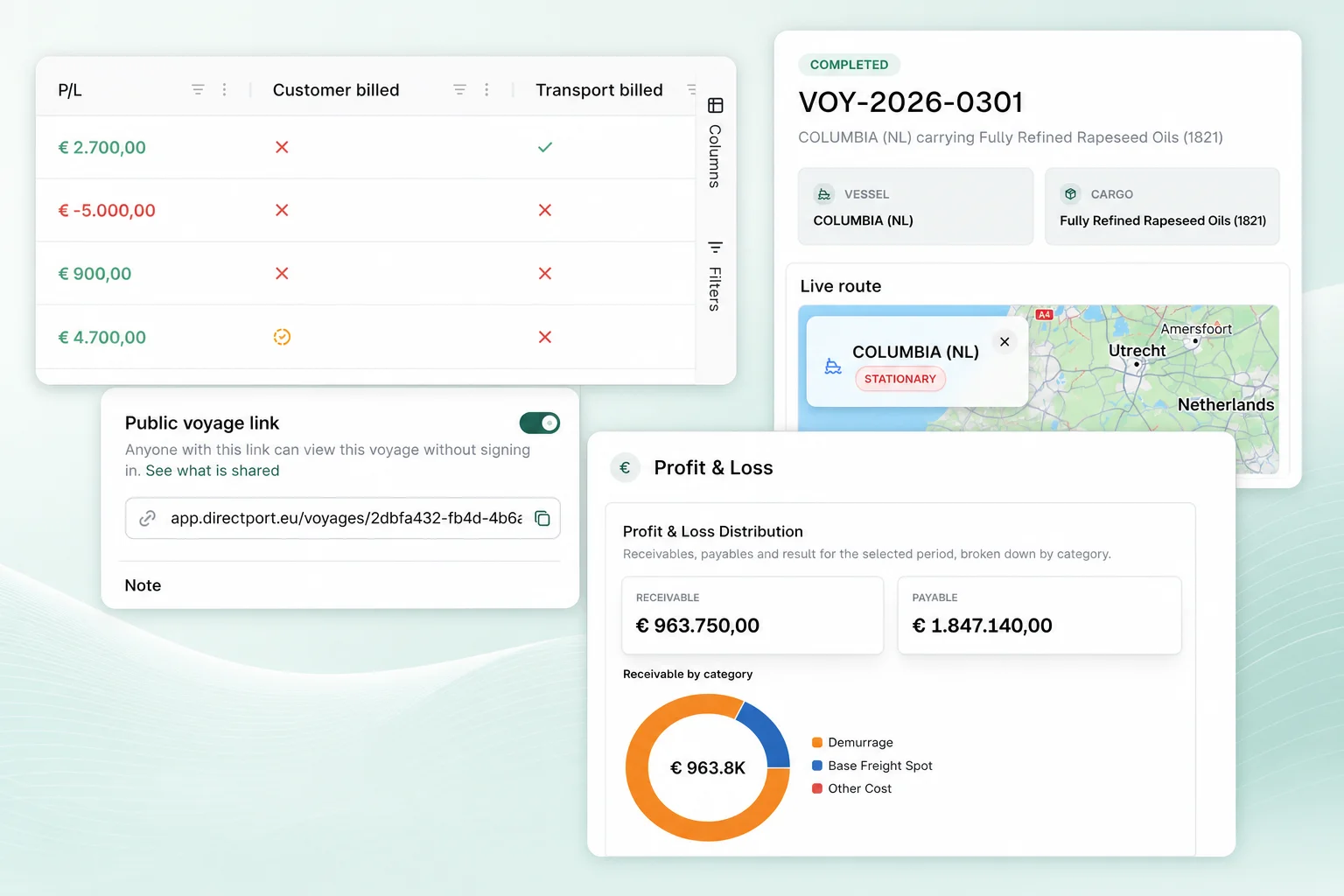
Features
Voyage Profit & Loss
Voyages now show a live Profit & Loss overview. The numbers come straight from the voyage's financial items, the same line items you manage in the cost sheets, so there is no separate bookkeeping to maintain. Receivable is what you invoice the customer, Payable is what the transport invoices you, and Result is the difference. Amounts exclude VAT and cancelled items are skipped.
Per voyage, the P/L lives under the Financial tab's Combined View and includes a breakdown by cost category, so you can compare the customer and transport side of each. On the Voyages page, the financial view (€ icon) lists one row per voyage with Receivable, Payable, P/L and "Customer billed" / "Transport billed" status columns, with totals pinned at the bottom. Voyage Insights has a new Profit & Loss section as well, plus multi-select customer and transport party filters.
Read the voyage profit & loss guide.
Public Voyage Sharing
Voyages can now be shared with anyone through a read-only public link. Open the Share menu on a voyage, switch on Public voyage link, and optionally add a note that is shown on top of the shared page. Anyone with the link can follow the voyage without signing in. The shared page shows the vessel and cargo summary, the route schedule with planned and actual timestamps per stop, cargo weights and public tracking data. Internal voyage notes, remarks, pricing, costs, documents, comments and user accounts stay private.
Terminal Planner: Scoped Sharing & Product-Aware Stock Figures
Public planner links can now be scoped to selected terminals. The new share dialog lets you pick which terminals are included in the read-only view, and shows a QR code next to the copyable link, which is handy for phones and wall displays.
Storage groups now declare which products count toward their incoming figures. A discharge only adds to a group's expected stock if the operation's product is on that list, so stock projections stay accurate at terminals that handle several products. Planned stock movements also land on the correct day: today's incoming and consumption now affect tomorrow's stock.
Planner Event Duplication & Cleaning Flag
Planner cards can now be duplicated to a chosen date and start time, even from past, read-only events. This replaces the old "continue next day" shortcut. When a single terminal is selected in the planner, new operations pre-select it. Operations also got a Cleaning flag, shown as a C suffix on the card's type badge (LC, DC, MC) in the planner and on the shared public view.
Financial Inbox & Invoice List Improvements
Invoice numbers on financial inbox documents can now be edited directly on the inbox item, so you don't have to open the linked invoice to fix a misread or missing number. Duplicate detection in the inbox is more stable, compares against a bounded window of recent invoices, and shows a clearer notice when it finds a potential duplicate.
The separate posted-invoices view has been retired. Sales and purchase invoices now each live in a single table, so search, filtering and period grouping all happen in one place.
Fixes
- Voyage list filters are now remembered when navigating away and back.
- Invoice lines are consistently ordered by line number on invoices and documents.
- Creating or cloning an invoice now returns you to the invoice list instead of leaving you on the form.
- The invoice number column stays readable when the invoices grid is resized.
- Document lists show a proper loading state while documents load instead of appearing empty.
- Planner terminal auto-select no longer overrides the terminal when editing an existing event.
- Duplicating a planner event now waits for the copy to exist before switching to it.
- Past day cards in the planner are visually softened, and the planner stack gained bottom spacing on mobile.
Other
- The legacy terminal schedule has been removed in favour of the Terminal Planner.
- Planner terminal chips are now ordered by creation date.
- The platform version is now centralized at the repository root and used for deploys.
- Vulnerable dependencies were updated, and an XLSX import issue blocking edge function deploys was resolved.
Release 30
21.05.2026 Release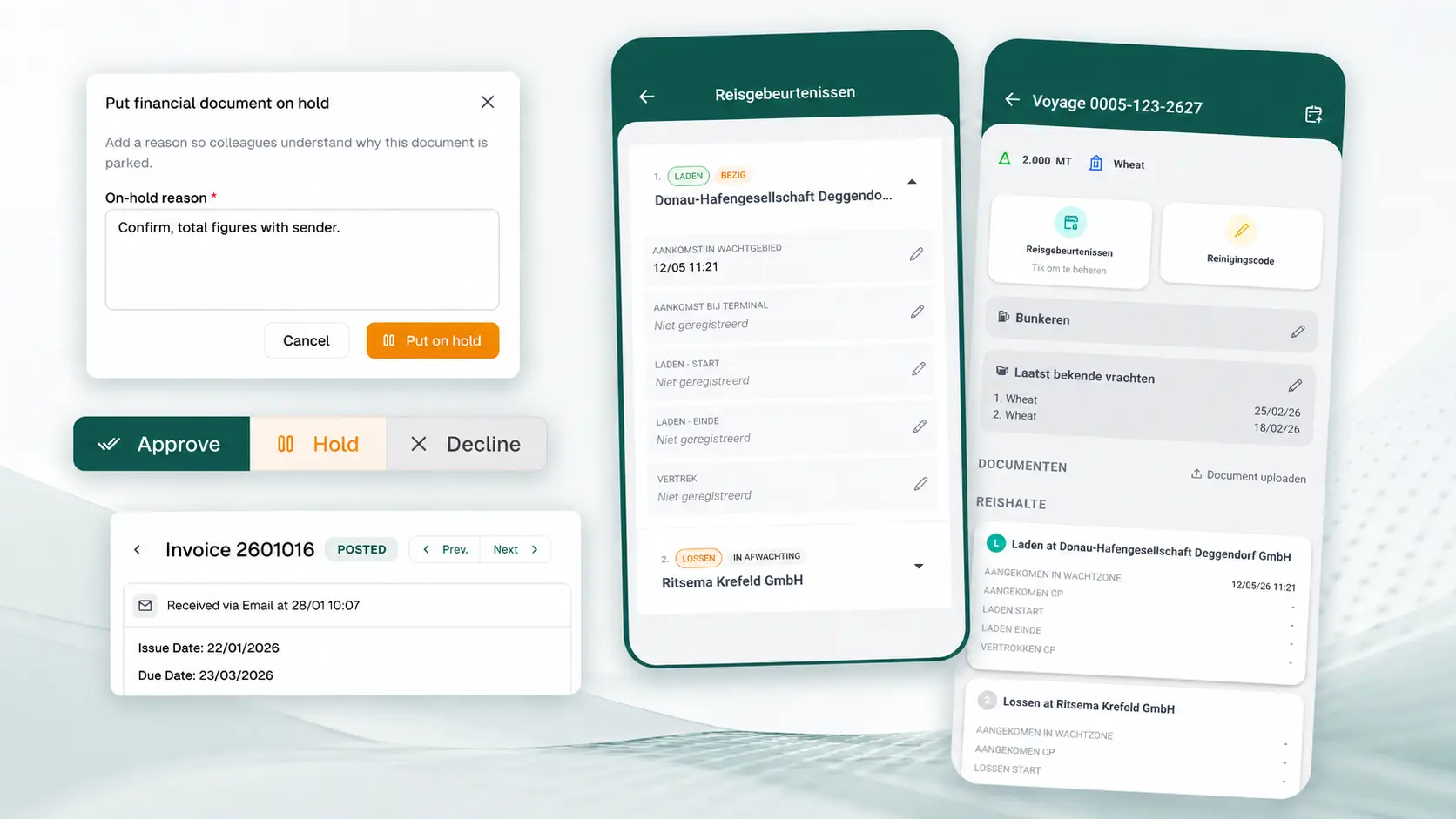
Features
Financial Inbox Review Flow
Financial inbox documents can now be placed On Hold with a reason when they are waiting for clarification, follow-up, or missing information. On-hold documents are shown as their own status in the inbox, detail view, kanban cards, and document activity trail, while approval and decline actions clear the hold state automatically.
The linked invoice card on a financial document has also been tightened up. Users can now edit the linked invoice's Paid state and internal reference directly from the inbox item, and the inbox table now includes the linked invoice reference as a first-class column.
Terminal Planner Detail & Week Planning
The Terminal Planner now starts from the ISO week by default, shows week numbers in the planner subtitle, and keeps planner preferences in the shared persisted app state. Planners can still switch back to a today-based view when that is more useful for day-to-day operations.
Planner cards now support extra cargo context with Origin and Notes fields, making it easier to keep operational planning details visible without leaving the calendar.
Mobile Captain Voyage Events
The mobile voyage events screen has been rebuilt around per-stop accordions. Captains can review each stop in route order, see whether a stop is pending, in progress, or completed, and update arrival, operation, and departure timestamps from the relevant stop row.
Captain voyage loading now separates active voyages from historical voyages, keeping current work visible while still allowing recent completed voyages to remain available on the home list.
Fixes
- Voyage cargo yearly ids are now treated as immutable once assigned, so completing or cancelling a voyage no longer clears the existing cargo id.
- Incoming financial inbox documents can be put on hold without being counted as undealt or overdue in the main inbox views.
- Suggested outgoing invoice numbers now use the highest numeric invoice number from recent issues instead of assuming the most recent issue is numerically highest.
- Financial document previews recover from missing or failing PDF previews instead of leaving users on an indefinite loading state.
- Terminal Planner forms avoid iOS input zoom, and planner preference persistence was moved out of ad hoc local-storage keys.
- The mobile app now uses the Expo updates hook for OTA update prompts and refresh checks.
Other
- Administration gained retry actions for stuck or failed incoming emails from the emails grid.
- Admin monitoring now cross-checks Resend email activity against database webhook receival and edge-function health.
- Euris tracking-service calls now use the configured API token directly for followed tracks and ship insight requests.
- Financial inbox layouts, inbox party cards, document blocks, and linked invoice cards were simplified for denser review on desktop and mobile.
Release 29
07.05.2026 ReleaseFeatures
Terminal Planner / Operations Calendar
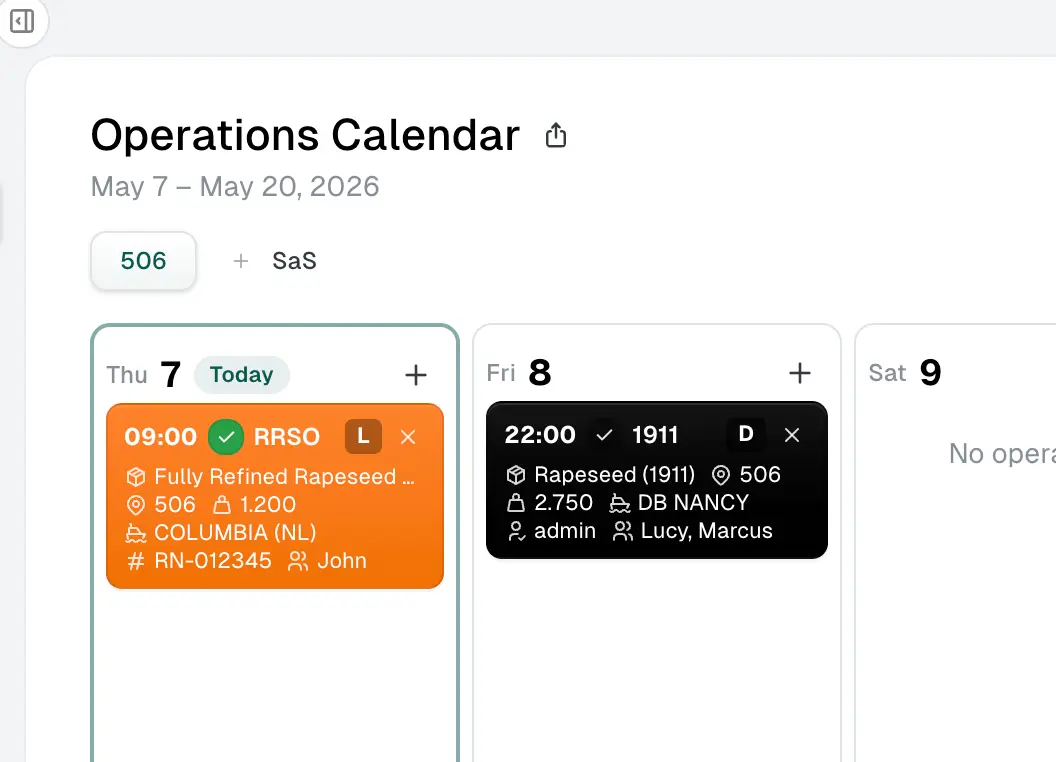
DirectPort now has a dedicated Terminal Planner for coordinating terminal operations in one shared 14-day Operations Calendar. Open Terminals > Planner to plan loadings, discharges, maintenance, team coverage, and expected stock movement across one or more terminals.
The planner supports terminal chips, search, member filtering, today/date navigation, product-coloured operation cards, confirmation state, supervisors and team members, reference numbers, vessels, quantities, and operation-type badges. Planners can drag operations between days in the calendar, move work from the edit modal, continue an operation on the next day, and review recent changes from the activity drawer.
Read the terminal planner guide.
Stock Planning, Public Views & Mobile Layout
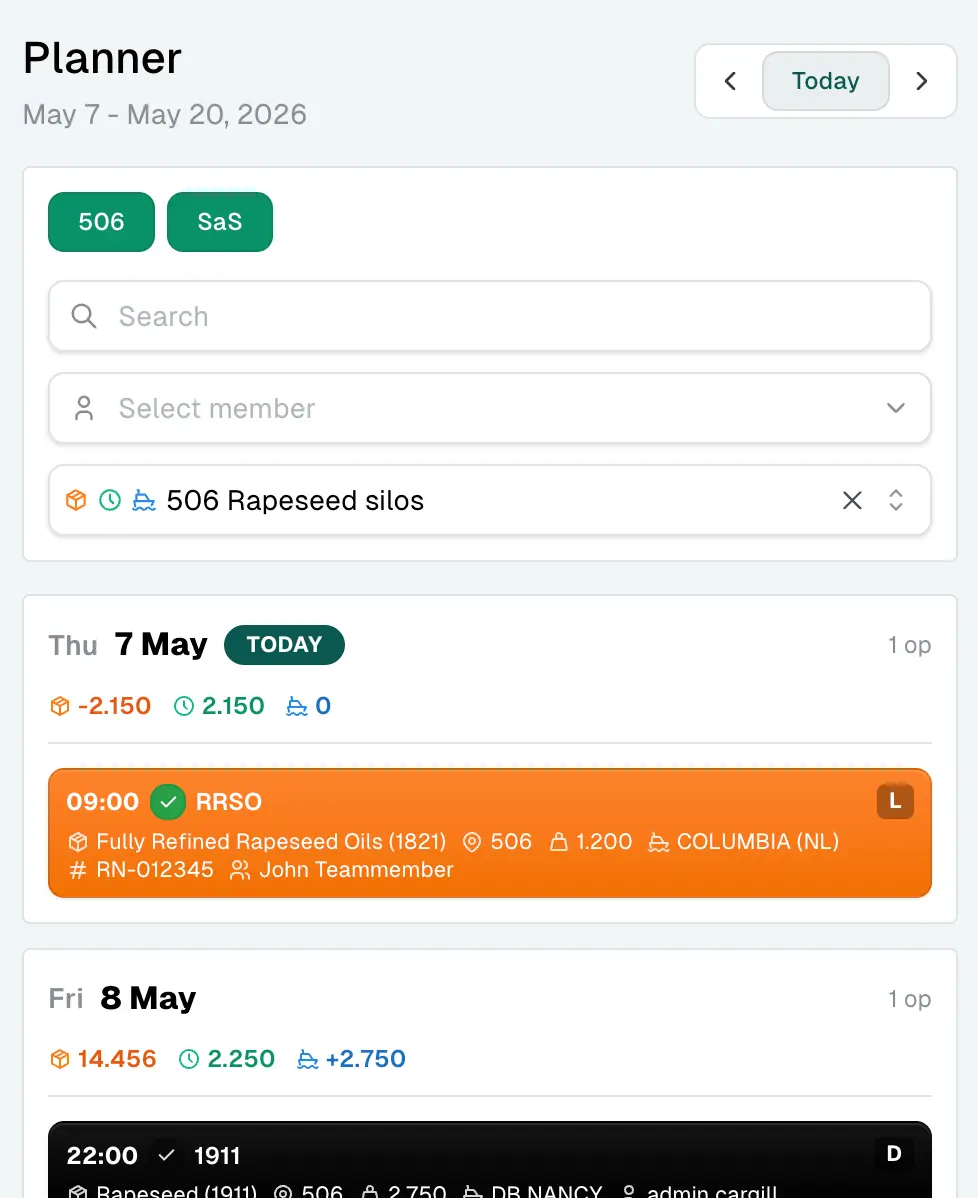
The planner can now show optional storage-group figures beside the operations calendar, including expected stock, daily consumption, and incoming discharge quantities. Storage groups can be configured per terminal or across all selected terminals, and stock or consumption can be overridden for a specific planning day when the operational plan needs manual adjustment.
Operations planners can also copy a read-only public planner link for external or wider team visibility. The shared view keeps search, member filtering, storage-group selection, and compact/mobile browsing available while keeping the plan protected from edits.
Terminal Operation Reconciliation
Completed terminal operations can now link back to matching planner events. When a completed loading or discharge has exactly one matching planner card for terminal, product, type, vessel, and local operation date, DirectPort links the records and syncs the planner quantity from the completed operation's transferred shift weight.
Fixes
- Terminal operations now warn when voyage stop information is missing before completing a loading, reducing hard-to-debug completion failures.
- The planner handles long day columns, compact/mobile layouts, member filters, restored activity entries, and default event values more reliably.
- Financial inbox filters, priority navigation, and previous/next item behavior are now aligned more consistently, including responsive inbox item layout improvements.
- Invoice forms now warn before leaving with unsaved changes, and submit errors no longer clear user-entered changes.
- Fixed assets are now scoped to tenant entities more consistently.
- Admin status probes avoid stale browser or proxy cache responses.
Other
- Admin gained a reworked dashboard layout with improved charts, global activity, email, first-party, and third-party health widgets.
- The mobile app now orders active voyages with the oldest active voyage first.
- Main-app TypeScript diagnostics were reduced across hooks and components.
Release 28
23.04.2026 ReleaseFeatures
Fixed Assets, Capitalization & Depreciation
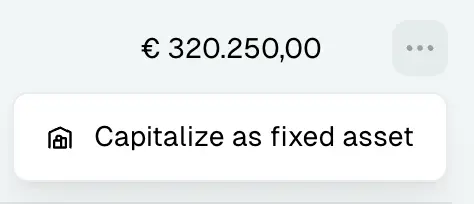
DirectPort now lets you capitalize qualifying incoming invoice lines into fixed assets directly from purchase invoices. Create a new asset or attach the line to an existing one, set the useful life and in-service date, review linked cost lines, and follow the depreciation schedule from the new Financial > Fixed Assets area.
Depreciation now flows through the broader financial views as well. Instead of treating a capitalized purchase as one large one-off expenditure, DirectPort now replaces that hit with scheduled depreciation in the Financial Dashboard, Profit & Loss, and project financial views. The schedule also accrues per day, so partial first or last months and disposal months are prorated more accurately, with Accumulated depreciation today and Book value today visible on the asset page.
Financial Inbox: Table or Kanban
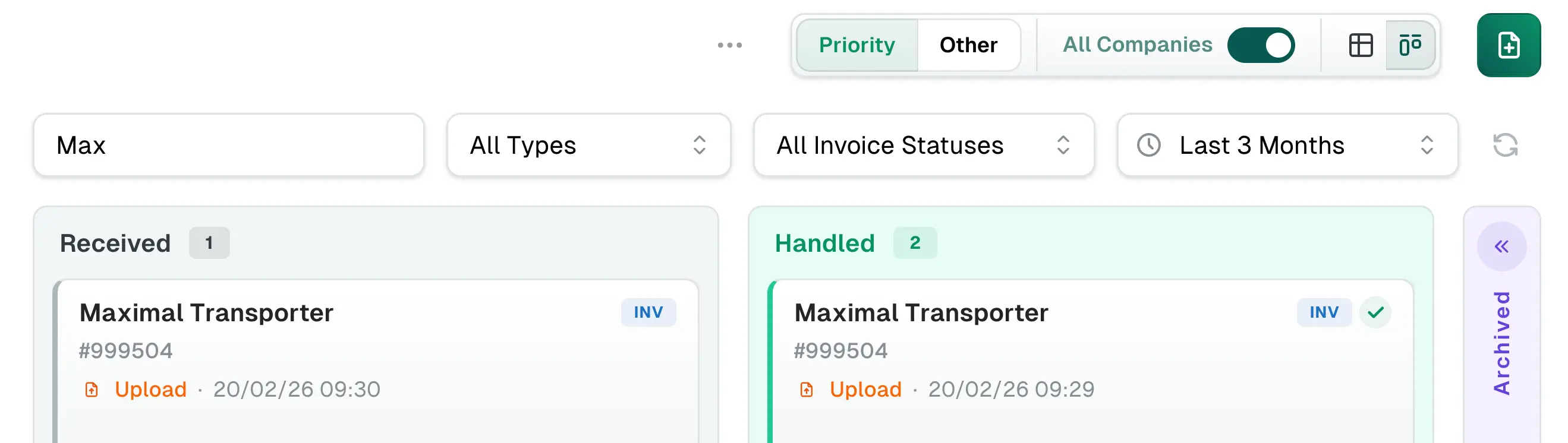
The financial inbox now has two working views: stay in the familiar table for dense filtering and drilldown, or switch to a kanban board that separates work into Received, Handled, and Archived lanes. The toolbar has also been simplified, with a clearer Priority / Other split, faster upload access, and the same search, period, type, invoice-status, and combined-company controls available across the inbox workflow.
Report Creator Improvements
The Report Creator now keeps more of each user's setup and shows richer voyage-cost context. The Voyage Costs report now sums B/L weights across all loading stops, includes a Unit Cost column for freight rows, and remembers your grid configuration per report so columns, filters, and layout changes persist when you come back.
Fixes
- Fixed several fixed-asset edge cases: residual value is now fetched correctly in the asset list, capitalization errors no longer fail silently, and asset edits use direct updates instead of unnecessary upserts.
- Fixed financial inbox table performance regressions caused by grid-state updates.
- Fixed the inbox Priority filter so it also includes handled documents that were approved or declined.
- Improved inbox item readability by separating the status badge label from the timestamp and author metadata.
- Outgoing Peppol invoices now include Purchase Order Reference alongside Buyer Reference when sent, improving compatibility with receivers that expect the PO field explicitly.
Other
- Invoices now offer a Group by financial period toggle, making period-based bookkeeping review easier from the invoices screens.
- Financial dashboard wording now aligns better with Profit & Loss by using Income and Expenditure labels more consistently.
- Received Peppol inbox documents now persist the original package in storage, which makes later preview/download retrieval more reliable and shows whether the package came from stored files or a live Recommand fetch.
- Declining a financial inbox document can now include an optional decline reason, and that reason is shown on the detail page until the document is approved or rolled back.
Release 27
02.04.2026 ReleaseFeatures
Profit & Loss View
DirectPort now has a dedicated Profit & Loss view in Financial, replacing the older expense vs income screen with a project-aware control center. Filter by date and project, switch Combined View on or off, review Out / In / Net / Paid / Unpaid at a glance, follow the trend over time, and drill from project profitability into account- and invoice-line detail.

Reworked Projects Management
The Projects area has been rebuilt around live financial control instead of a flat master-data list. The overview now surfaces Out / In / Net / Pipeline / Last activity for the selected period, while each project page combines snapshot cards, trend, invoice actuals, pipeline, reconciliation signals, and notes in one place. Project assignment is also much easier: you can assign a project while approving a financial inbox item and bulk-assign a project across selected invoices from the invoices grid.
'/%3e%3cg%20filter='url(%23blur)'%3e%3ccircle%20cx='296'%20cy='224'%20r='144'%20fill='%23D7F1ED'/%3e%3ccircle%20cx='1304'%20cy='226'%20r='136'%20fill='%23DDEEFF'/%3e%3ccircle%20cx='1264'%20cy='714'%20r='160'%20fill='%23FFE4D8'/%3e%3c/g%3e%3cg%20filter='url(%23shadow)'%3e%3cpath%20d='M516%20332C516%20288.922%20550.922%20254%20594%20254H760L826%20196H1024C1067.08%20196%201102%20230.922%201102%20274V352H516V332Z'%20fill='url(%23folderTab)'/%3e%3cpath%20d='M484%20358C484%20314.922%20518.922%20280%20562%20280H1038C1081.08%20280%201116%20314.922%201116%20358V658C1116%20701.078%201081.08%20736%201038%20736H562C518.922%20736%20484%20701.078%20484%20658V358Z'%20fill='url(%23folderBody)'/%3e%3crect%20x='552'%20y='374'%20width='496'%20height='290'%20rx='30'%20fill='rgba(255,255,255,0.12)'/%3e%3crect%20x='610'%20y='430'%20width='380'%20height='42'%20rx='21'%20fill='rgba(255,255,255,0.20)'/%3e%3crect%20x='610'%20y='496'%20width='314'%20height='28'%20rx='14'%20fill='rgba(255,255,255,0.16)'/%3e%3crect%20x='610'%20y='544'%20width='344'%20height='28'%20rx='14'%20fill='rgba(255,255,255,0.16)'/%3e%3cg%20transform='rotate(-10%20656%20594)'%3e%3crect%20x='622'%20y='560'%20width='108'%20height='138'%20rx='24'%20fill='%23FFFFFF'/%3e%3crect%20x='644'%20y='590'%20width='64'%20height='16'%20rx='8'%20fill='%23E6F1F0'/%3e%3crect%20x='644'%20y='622'%20width='50'%20height='14'%20rx='7'%20fill='%23EDF4F3'/%3e%3crect%20x='644'%20y='648'%20width='58'%20height='14'%20rx='7'%20fill='%23EDF4F3'/%3e%3c/g%3e%3cg%20transform='rotate(8%20956%20588)'%3e%3crect%20x='906'%20y='548'%20width='112'%20height='144'%20rx='24'%20fill='%23FFFFFF'/%3e%3crect%20x='930'%20y='580'%20width='64'%20height='16'%20rx='8'%20fill='%23E6F1F0'/%3e%3crect%20x='930'%20y='612'%20width='50'%20height='14'%20rx='7'%20fill='%23EDF4F3'/%3e%3crect%20x='930'%20y='638'%20width='58'%20height='14'%20rx='7'%20fill='%23EDF4F3'/%3e%3c/g%3e%3c/g%3e%3ccircle%20cx='1116'%20cy='644'%20r='76'%20fill='%23FFFFFF'%20stroke='%23E5F0EE'%20stroke-width='14'/%3e%3ccircle%20cx='1116'%20cy='644'%20r='46'%20fill='%23EE7752'/%3e%3cpath%20d='M1092%20646L1108%20662L1142%20626'%20stroke='%23FFFFFF'%20stroke-width='12'%20stroke-linecap='round'%20stroke-linejoin='round'/%3e%3c/svg%3e)
Cmd/Ctrl+Click New-Tab Navigation
You can now use standard Cmd/Ctrl+click behavior on sidebar links and grid or table items to open records in a new tab. DirectPort now resolves entity links more consistently across the sidebar, invoices, financial lists, master data, voyages, vessels, and terminal tables, making it easier to compare records without losing your place.

Fixes
- Posted invoices now use AG Grid row grouping instead of the old manual accordion treatment, and the view remembers filters, selected tabs, and open sections more reliably when you drill into an invoice and back.
- Fixed time-charter base-type filtering in financial processing.
- Fixed broken mobile nav-drawer links and tightened the mobile header layout.
- Fixed document timestamp extraction timezone handling and upload cases where missing entity ids produced unusable document paths.
- Fixed financial inbox/archive inconsistencies around linked-party naming, badge counts, archived item lookups, and approval messaging.
- Fixed a terminal operation crash when stop-order data is missing.
Other
- Invoices can now show their linked financial document directly.
- Price versions now support tonnage-range basis, and several pricing tables show more useful columns.
- Recurring invoice calculation breakdown was reworked for clearer tonnage handling and display.
- Admin tooling gained manual storage backups and improved monitoring widgets.
Release 26
19.03.2026 ReleaseFeatures
Voyage Bunkering & Fuel Tracking
DirectPort now supports a fuller bunkering workflow across web and mobile. Captains can record fuel Level events from the mobile app, office users can add priced Bunkering events from the vessel or voyage page, and the voyage Bunkering section now combines those readings into suggested consumption, cost, and CO2 figures. Open a voyage and go to Bunkering to review the suggested values, then confirm them when you are ready to create the related financial items.
Autofill Timestamps from PDF Documents
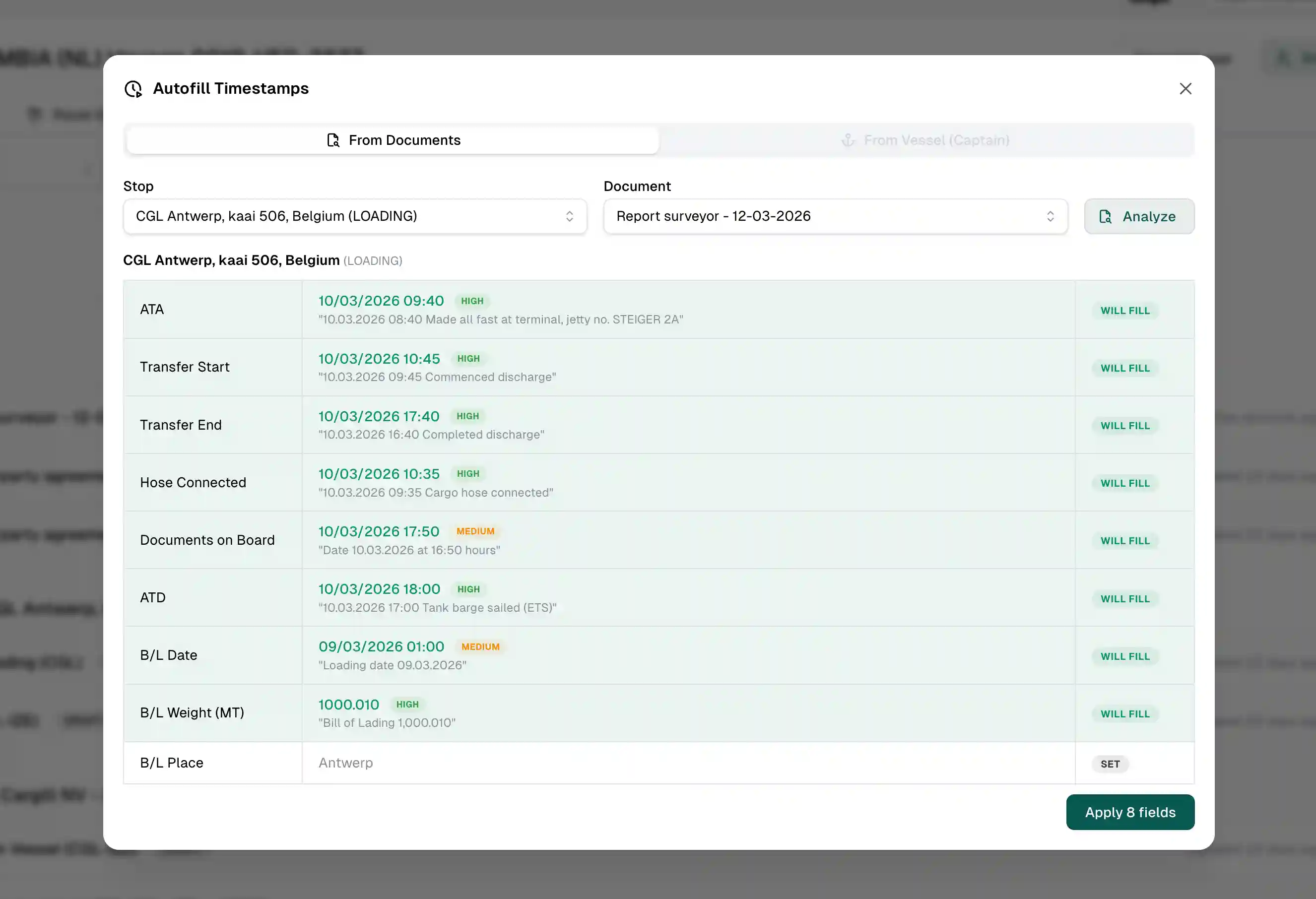
The Autofill Timestamps action on a voyage can now analyse uploaded PDF documents in addition to vessel tracking. Choose a stop, select a PDF, review the suggested ATA / ATD / transfer / B/L values, and apply the fields that are still empty. This is especially useful when signed terminal or cargo documents arrive before someone has entered the timestamps manually.
Financial Inbox Workflow Refresh
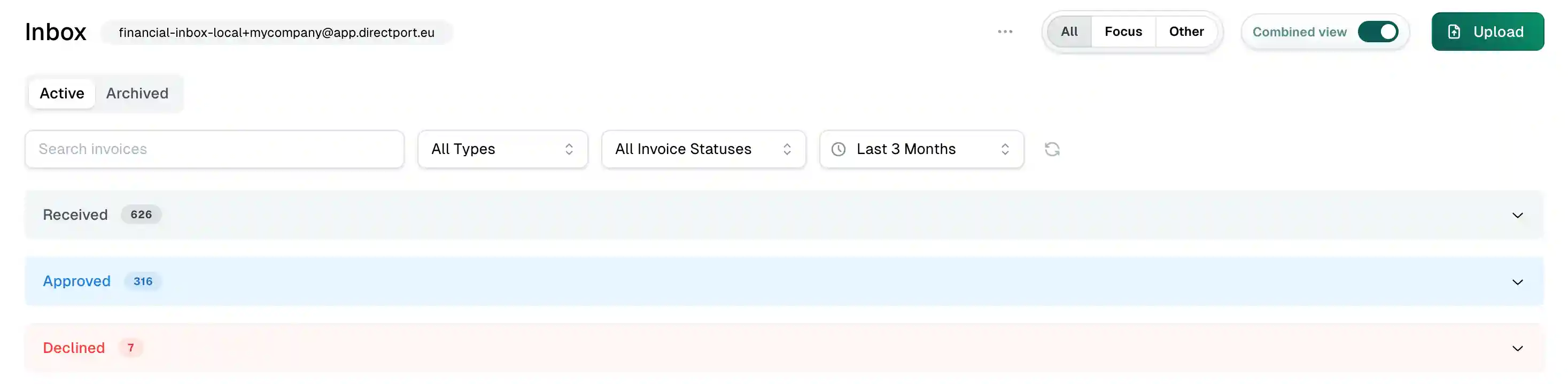
The financial inbox has been reorganised to better match how documents move through the process:
- Archived documents now live in their own tab, so the active inbox stays focused on work in progress.
- Posted invoices now have a separate view grouped by fiscal period, making bookkeeping follow-up easier.
- The inbox mode selector now offers All / Focus / Other, giving a clearer split between AI-matchable items and everything else.
Party-Specific Finance Setup
Projects and accounts can now be scoped per tenant entity party, which helps keep finance data cleaner in multi-entity setups. When creating or selecting these records, DirectPort keeps them aligned with the active tenant party. Invoice lines also now use VAT suggestions and defaults based on the active tenant party's country where configured, instead of always starting from a flat 21%.
Fixes
- Fixed financial inbox filters, counters, and prev/next navigation so they stay aligned with the active tab and filters.
- Fixed some inbox posting scenarios being blocked by overly strict posted-invoice number enforcement.
- Fixed inbox party naming to prefer the linked party record when one exists.
- Fixed financial event pages being visible in frontend flows where the user should not have had access.
- Fixed several mobile usability issues around location permissions, iOS document picking, and header spacing around device notches.
Other
- Operation types can now have colours, which are also shown when creating an operation.
- Timestamp inputs now allow up to 7 days in the past and 1 day in the future, reducing friction for delayed entry.
- Peppol-sent invoices can still be adjusted when needed from the invoice action menu.
- Added a published privacy policy page, admin backup tooling, and a Resend monitoring widget.
Release 25
03.03.2026 ReleaseFeatures
Autofill Timestamps from Vessel Tracking
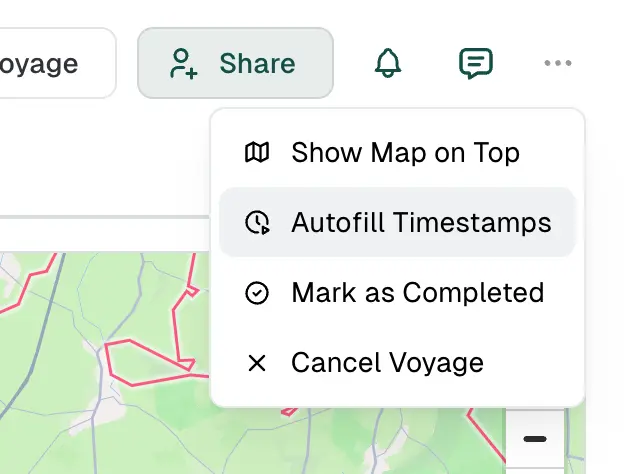
When a voyage has vessel tracking data available, you can now automatically populate stop timestamps (arrival, departure, etc.) from the vessel's recorded positions. Open the action menu on a voyage and select "Autofill Timestamps" to review and apply the suggested times — no more manual copy-pasting from tracking logs. Autofill from uploaded documents is coming soon.
Copy Demurrage Calculation to Other Party
After calculating demurrage on one side of a voyage (e.g. the supplier), you can now copy that calculation to the matching terms on the other party's side with a single click. This avoids re-entering the same laytime and demurrage figures when both parties share the same terms.

Voyage Costs Report
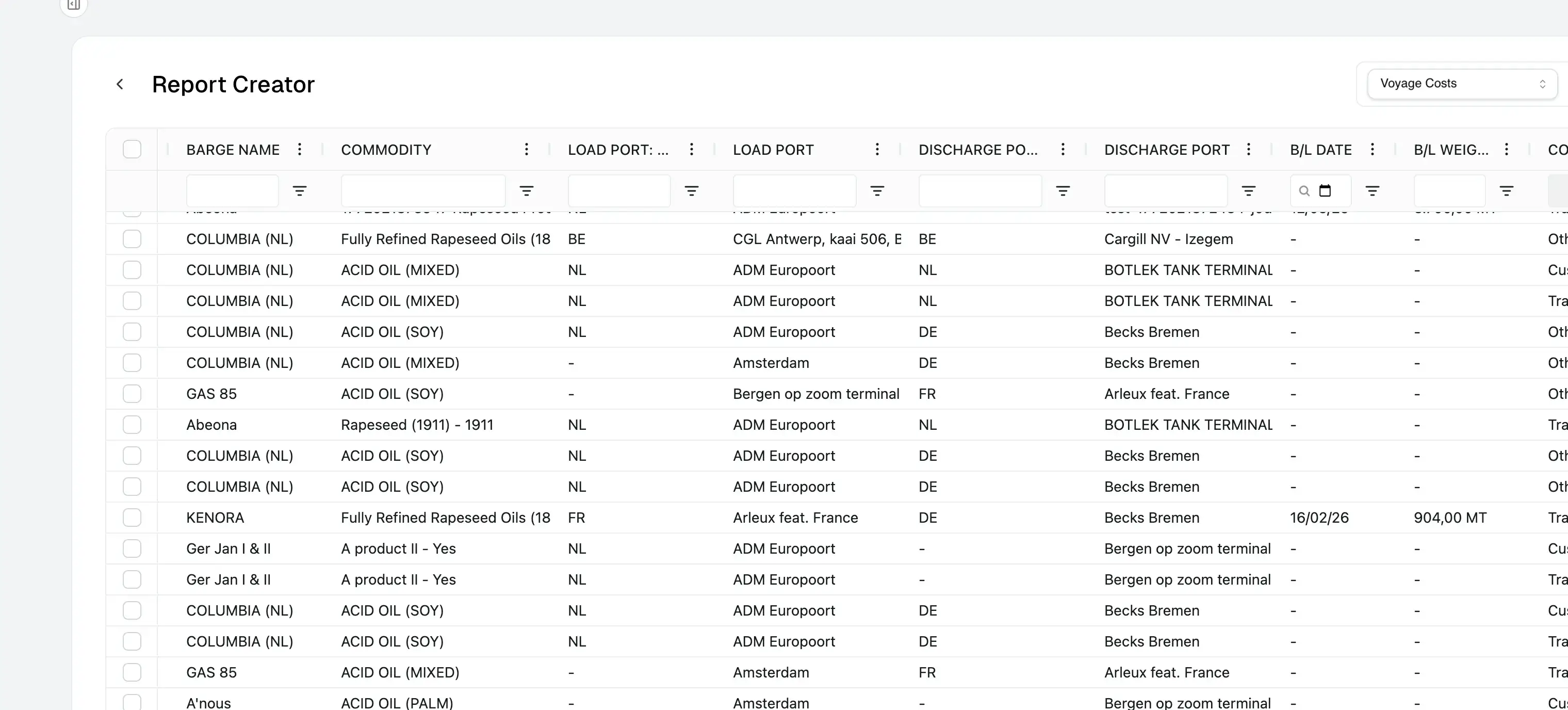
A new Voyage Costs report is now available in the Report Creator. It shows financial items enriched with voyage context — costs, vendors, invoice numbers, load/discharge ports, B/L dates and weights — making it easy to build cost overviews across voyages.
Financial Inbox Improvements
- Time filter: the financial inbox now defaults to showing items from the last 3 months, with a configurable time range selector. The direction filter has been removed in favour of clearer defaults.
- Soft-delete & restore: inbox items can now be marked as deleted and restored if needed, keeping your inbox tidy without losing data permanently.
- Search & navigation: the search query is now persisted in the URL, and the prev/next item navigation correctly accounts for the active filter.
Invoice Totals Row
The invoices table now shows a totals row at the bottom, giving you an at-a-glance sum of invoice amounts across the current view.
Fixes
- Improved invoice rounding consistency: VAT and total calculations are now robust against floating-point precision issues across the frontend, invoice templates, and database triggers.
- Fixed recurring invoice deficit-to-threshold being calculated per day instead of per operation.
- Fixed route operation map trying to calculate a route when a stop has only one location or a location without coordinates.
- Fixed self-billing scenario label being ambiguous when viewed from the financial inbox table.
- Fixed error boundary not displaying errors and not forwarding them to Sentry.
- Fixed invoice line allocation amount not being editable.
- Fixed voyage insights cargo statistic column colours being too similar.
Other
- Consolidated the voyage financial combined view: demurrage and low water sections are now grouped under a single accordion for clarity.
- Refactored the demurrage calculator for improved stability and reduced re-renders.
- Admin app adopted Mantine UI and AG Grid, replacing the previous custom table and modal components.
- Added TypeScript type-checking to the main-app pre-commit hook.
- Prepared template sync script for managing HTML document templates from the repository.
- Upgraded Vite from v6 to v7.
- Added npm dependency caching to GitHub Actions deploy workflows.
- Purged unused vessel technical files and other dead code.
- Admin app now includes Sentry and email monitoring widgets.
Release 24
20.02.2026 ReleaseFeatures
Invoice Line Allocation
- New tool to allocate invoice lines to voyage financial items. Available from the invoice detail page and the financial inbox, with support for creating new financial items on the fly and overwriting amounts.
Self-Billing Invoices
- Support for self-billing workflows: create self-billing invoices and credit notes, send them via Peppol, and see a clear "Self-Billing" badge on the invoice page.
Purchase Order Processing
- The financial inbox now recognises and processes Purchase Orders. Approving a PO automatically creates a linked Sales Invoice with the PO number as buyer reference.
Time Charter Calculation
- Automatic time charter cost calculation for voyages with daily-rent contracts, including off-hire day deductions. Triggered when the last stop's operation completes.
Voyage Insights Filters
- Insights dashboard now supports custom date ranges, status filters (Completed / Active / All), weight basis selection (BL / Planned), and filtering by customer party.
External Invoice Number
- Financial items can now store an external invoice number for invoices managed outside the system. Visible in the financial items sheet and detail form.
Location Assigned Region
- Locations can now have a manually assigned region, independent of the auto-detected address region.
AB Number on Parties
- Parties can now store an external AB Number reference, which also appears on generated invoice documents.
Financial Items Grid Improvements
- Redesigned columns with voyage reference info, scope/status filters, improved status chips, and richer search.
Invoices List Improvements
- The party column now contextually shows "Customer" or "Supplier" depending on direction. Search text persists in the URL. Self-billing invoices are labelled.
Expanded File Upload Support
- Financial document upload now accepts Excel (.xls, .xlsx) and CSV files in addition to PDF.
Prices Table Enhancements
- New columns for Scope, Quantity config, and Project. Delete added for price versions.
Fixes
- Fixed self-billing credit notes and invoices being sent with the wrong Peppol document type and recipient. Empty invoice lines are now correctly excluded from credit notes.
- Fixed invoice detail page not showing a proper loading state or clear error message when an invoice cannot be found.
- Fixed bill of lading weight changes not correctly triggering financial item recalculation for per-tonne freight.
- Fixed vessel certificate form fields (name, type, start date, validity period) being incorrectly required; only certificate number and end date are now mandatory.
- Fixed GMP/OVOCOM certificate matching to also match by certificate name and correctly check expiry dates.
- Fixed invoice link icon in the financial items sheet not showing when the linked invoice has no number yet.
Other
- Upgraded Recharts from v2 to v3.
- Insights calculations now use financial item fields instead of legacy voyage cost fields, improving accuracy and consistency.
- Invoice template now renders external reference fields (e.g. AB Number) for both buyer and seller.
- Booking note template now includes GMP/OVOCOM certificate information.
- Voyage info used for invoice generation now includes nomination key and SPO number.
Release 23
13.02.2026 ReleaseFeatures
Financial Inbox & Email Processing
- Upload and process financial documents via AI-powered email inbox, with support for multi-invoice emails, duplicate detection via fingerprinting, and attachment linking back to specific emails.
- Configure custom posted-at dates when posting financial inbox items, with improved filtering and focus options.
- Configurable company name in no-reply email sender addresses per tenant preference.
Invoicing
- Recurring invoices: full CRUD, configurable invoice lines/prices, subject templates, support for shift-priced operations with overtime hours, mixed grouping, and threshold to deficit calculation.
- Enforce unique invoice numbers per type/direction/seller, with optional issue date limits and chronological ordering.
- Allow creation of draft invoices without a number, while barring send/approval until one is assigned.
- Page numbers on HTML-to-PDF invoice documents.
- API endpoints to list and get invoices.
Voyage & Operations
- Set voyage operator with automatic 1 vs 2 financial sheet display based on whether operator differs from customer.
- Store voyage customer remarks (displayed on booking note).
- Store charter actual delivery timestamps and flag vessel schedule events as off-hire.
- Configure time charter duration properties for contracts and their vessels.
- Semi-hidden edit for terminal operation file number in operation details.
Pricing
- Price quantity formula support with threshold quantities.
- Improved prices and price versions data model.
Mobile
- Location tracking and update to Expo 54. (Limited availability)
Dashboard
- Redesigned dashboard overview widgets.
Fixes
- Fixed Peppol sending errors being opaque, negative amounts being rejected, and credit notes being mishandled for total-only lines.
- Fixed approved/Peppol inbox documents being deletable when they shouldn't be, and approved filter incorrectly showing posted/paid items.
- Fixed invoices sent via Peppol not being locked from editing/deletion.
- Fixed received Peppol credit notes not correctly capturing CN number and original reference.
- Fixed invoice lines: rounding showing wrong subtotal while editing, noisy inputs, and dropdowns not showing enough info.
- Fixed non-memoized invoice hooks causing endless renders and crashes.
- Fixed suggested invoice number not being tenant-party specific.
- Fixed formatNumber occasional misformatting.
- Fixed demurrage calculator crashing on cause selection and being prone to indefinite renders.
- Fixed voyage demurrage terms copy to customer not visually reflected before saving.
- Fixed financial inbox filters being forgotten on navigation.
- Fixed invalid date validation in request form.
- Fixed email processing: skip image/tiff attachments, handle progressive JPEGs, prune duplicates, and resolve invalid MIME type errors in AI API.
- Fixed webhook secret not being verified in terminal operation process endpoint.
- Fixed Mantine NumberInput onChange value processing issues.
- Fixed unsafe country flag access and miscellaneous minor warnings.
- Fixed route operation stop missing variable imports.
- Fixed tab navigation not moving row-by-row left-to-right (switched to table-based layout).
- Fixed supplier reference not displayed on invoice document.
- Fixed manual Peppol ID input not working.
Other
- Adopted edge_post for more concise and secure database-to-edge function executions.
- Improved processTerminalOperation with tenant filtering, correct grouping prefill, and refined recurring invoice logic.
- Reduced unnecessary UI renders across invoice and financial components.
- Improved email service process endpoint logging.
- Re-enabled production build minification.
- Various visual refinements to overview pages, sidebar, financial items, and invoice templates.
- Corrected FR charter party terms T&C.
- Import Supabase JS from npm instead of esm.sh to reduce availability issues.
Release 21
11.12.2025 ReleaseFeatures
Financial & Invoicing
- Financial Inbox: Introduced a financial inbox to view and record received Peppol documents directly in the database.
- Peppol Integration: Added dedicated Peppol configuration for parties with validation support.
- Invoice Attachments: Added ability to manage attachments on invoices, send them via Peppol, and preview incoming invoice PDF attachments.
- Invoice Management: Implemented the ability to clone invoices and preview invoices before finalizing.
Voyage & Operations
- Route Operations: Redesigned the route operations interface, featuring a new section for terminal operation timestamps.
- Waterlevels: Added a map view for waterlevels with an optimized fetching strategy.
API & Integrations
- Webhooks: Implemented webhook support for external integrations.
- Endpoints: Expanded API support to list, get, and update voyages and financial items.
Fixes
- Fixed Peppol attachments not being included when sending invoices.
- Fixed invalid processing of 0% tax rates during Peppol transmission.
- Fixed incorrect validation for Belgian (BE) VAT numbers.
- Fixed voyage details being prefilled too eagerly when creating a new invoice.
- Fixed validation errors and display regressions in the redesigned route operations view.
- Fixed invalid primaryColor themes in tenant configurations.
Other
- Reduced unnecessary rendering and fetching to improve performance within the voyage form.
- Added an activity overview to the admin application.
- Moved order export endpoints and improved tracking service typings.
- Added French and German Charter Party templates and included a booking note under templates.
- Added support for tenant logo links and enabled tenant configuration usage across all tenants.
- Updated OpenAPI specifications to include integrations and resolved scalar errors.
- Hardened Peppol endpoints for more robust access control.
Release 20
26.11.2025 ReleaseFeatures
Financial & Invoicing
- Added support for sending invoices via Peppol.
- Implemented multi-currency support within the financial module.
- Added ability to create credit notes directly from invoices and auto-generate numbers based on the last known record.
- Introduced management for financial items, item types, posting rules, and budgets under projects. Added ability to edit financial items and apply them to both sides of a voyage.
- Enabled manual addition of expenditure invoices and credit notes, and the ability to invoice one or more voyages.
- Reworked invoice templates, including support for multilingual invoices, payment details, and drag-and-drop line reordering.
- Added a financial view for voyages (default combined view) and expense vs. income breakdown per project.
- Added a mock flow for invoicing terminal operations.
Voyage & Operations
- Added new vessel statistics features.
- Added ability to attach a Project ID to a voyage.
- Added creatable cargo type inputs and the ability to inspect events.
- Allowed document uploads under specific operations.
- Updated voyage map to show routes even when timeframe information is missing.
- Added seconds display to event timestamps.
Other Features
- Added ability to view party details directly from the party input field.
- Added support for managing metadata on financial items.
Fixes
Voyage & Operations
- Fixed a crash when attaching a pre-existing captain with a code.
- Fixed an issue where financial items disappeared when linking a voyage to a project.
- Fixed the inability to deselect all parties/vessels in voyage insights.
- Fixed an issue where voyage timeline updates disappeared from the user view.
- Fixed duplicate trigger invocations on existing voyage upserts.
- Fixed synchronization issues between voyage data and cache flushing.
- Fixed an issue where modifying demurrage details depopulated the voyage form.
- Fixed validation problems with contract inputs.
- Fixed "Select All" functionality not respecting active filters.
Financial & Invoicing
- Fixed account code duplication issues across tenants.
- Fixed calculation errors where invoice lines with no tax resulted in no total calculation.
- Fixed correct handling of negative invoice lines.
- Fixed VAT inheritance issues on financial items and prevented deletion of non-draft invoices.
- Fixed misrepresented VAT numbers on invoice templates.
- Fixed data inheritance and formatting inconsistencies in the invoice module.
- Fixed issues where customer party and voyage references were not filling in on invoices.
- Fixed voyage cost cache updates after adding new extra costs.
- Fixed financial flow synchronization issues.
General
- Fixed Cloudmailin gasoil tenant matching to rely on slug instead of name.
- Fixed missing properties in the barging solutions service definition.
- Fixed dashboard navigation issues.
- Fixed missing fullcalendar package dependency.
- Fixed API options preflight rejection.
Other
Documentation
- Revised dashboard documentation to maintain a professional tone.
- Added comprehensive documentation for the Voyage Planning module.
- Added developer documentation on release procedures.
User Interface & UX
- Adjusted invoice line precision to 3 decimals.
- Configured financial sheet items to open on row press.
- Improved sidebar visibility and navigation for the voyage module.
- Resolved dark mode inconsistencies.
- Improved dashboard and topbar UI design.
- Clarified "unsaved changes" UX on voyage forms.
Chore & Refactor
- Purged deprecated financial-service elements and stale voyage inspection features.
- Refactored voyage insights visuals.
- Improved environment switching flow for the mobile app.
Release 19
10.10.2025 ReleaseFeatures
Voyages & Tracking
- Vessel Track Playback Controls: Users can now adjust playback speed and direction when reviewing historical vessel movements, enhancing voyage analysis.
- Improved Voyage Details (Partner Portal): Voyage display now separates loading and discharge stops, with clearer layout and navigation icons.
- Track Voyage Button: Completed partner requests now include a "Track Voyage" button, improving visibility into voyage progress.
- Conditional Navigation: Partner proposal details intelligently adjust navigation for completed requests, preventing dead-end flows.
API & Integrations
- Master Data Endpoints: New API routes for core master data (e.g., parties, vessels, products, etc.), allowing external integrations to query up-to-date datasets.
- Token Management: Added dedicated API tokens view for self-service token lifecycle management.
- Reference: Published OpenAPI 3.0 compatible spec on Scalar portal for easy onboarding.
- DB Tokens & API Identity: Added user_id for token-based permission inheritance.
Help & Documentation
- Help Portal Expansion: New help portal structure with sidebar guides and improved visuals across module introductions.
- Mobile App Development Docs: Expanded documentation covering environment configuration and NativeWind setup.
Fixes
Financials
- Fixed base freight cost formula missing in financial sheets.
- Fixed missing stop type display in voyage financial demurrage rows.
- Fixed dashboard not loading correctly when no orders are present.
Voyages
- Fixed voyage details not filled in when viewing voyage after creation.
- Fixed planned transferred weight prefill issue when two loadings existed.
- Fixed API edge case where a missing location caused route operation failure.
- Fixed mobile voyage stops not loading in correct sequence for captains.
- Fixed infinite loading loop on vessel details when vessel selection was null.
- Fixed seed data allowing null profile names in DB migration.
Other
- Centralized tenant configuration logic using new getUseTenantConfig() utility, simplifying tenant-aware UI logic across layouts and sidebars.
- Refactored VoyageDocuments component to use VoyageStopWithOperation type, improving data structure clarity and stop sorting.
- Reorganized API service resource endpoints for clearer separation and maintainability.
- Enhanced role permission feedback with alert UI for administrators.
Release 18
25.09.2025 ReleaseFeatures
Contracts
- Mark contracts as Signed with clear status badges (ACTIVE, EXPIRED, SENT, PENDING) and inline alert + action to mark signed.
- Improved ContractInput details (header, grouped effective dates + hire rate, emphasized key data).
- Charter-party terms UI refined; fixed visibility so relevant contracts appear for vessels and parties.
- Entity-based file organization for contracts; uploaded files stored under the contract's entity folder.
- Zod validation added to contract form; multi-vessel selection via VesselsMultiInput.
- Contract service endpoints refactored with centralized error handling and more informative errors.
Voyages
- Nomination date added end-to-end: DB column + migration, types, query hooks, initial values, and DateInput in forms.
- Share Voyage: send to captain by short ID (6-char max, validation, success/error feedback).
- Mobile voyage cards show cargo type yearly ID as badge; detail views pick the best timestamp per stop; numbers formatted for weights.
- Voyage stops: display arrival at waiting area (UI + translations).
- Captain inputs: show recent captains per vessel, grouped "Recently used / Other", display short IDs, improved fetching via API.
Incidents
- File attachments for voyage incidents: upload, list, download, remove with size formatting and notifications.
- Storage paths include incident ID; incident entity auto-created via trigger + FK to entities.
- Timeline components refactored with forward refs to work with accordions; incident event shows attachment count.
Documents & Templates
- Universal Booking Note template with tenant branding (logo_url, tenant config) and safer tenant access in transforms.
- Document upload pipeline supports useEntityIdInPath for dynamic paths; HTML preview closes on click outside.
- Mobile: show only documents shared with/by captain.
Tracking
- Historical replay of vessel movements with export of tracking history.
- When multiple sources present, pick most recent position.
- Ignore empty track positions to avoid bad traces.
Navigation & Responsiveness
- Responsive sidebar & mobile nav: collapsible categories, tenant-specific colors/logos/shades, active-state logic, terminal/vessel selectors in drawer.
- MobileHeader introduced; MobileNavDrawer in main layout; multiple screens re-flowed with Mantine Flex/Box and unified media queries.
- Voyage form/map layout: fixed map height, route-operations map scaling corrected; core flows viable on mobile.
Comments
- Comments Drawer/section added across Voyage, Request, and Master Data details; ordering tuned to show comments before events where relevant.
Data Grids
- Alphabetical comparator for nested fields (e.g., vessel.name) across grids; integrated via utility + cellRendererParams.
Branding / Tenant Config
- Tenants table extended with logo_url and config; used in templates, terminal-operation transforms, and UI header.
Improvements
- Contract UI polish across components; clearer charter-party terms.
- Voyage detail/layout simplifications; header buttons consolidated (Events, Share).
- Person-in-Charge input now autocomplete with DB-backed profiles and deduped dataset.
- Vessel pages: filter by dimensions + user-selectable extra columns.
- Developer experience: global Supabase headers in dev to skip ngrok warning; media-query constants added; many lint/format cleanups.
Fixes
Financials
- Fixed transport invoice not including demurrage and water-level cost.
- Fixed freight cost summary not including per-stop demurrage; demurrage now shown per stop in voyage financials.
Contracts
- Fixed contracts not visible in charter-party terms (vessel/party views).
- Fixed contract inputs not showing selected value and not allowing deselect.
Documents
- Fixed documents added to a draft voyage not appearing after publish; fixed "shared by captain" display logic under RLS.
- Fixed URI placeholder replacement to be more generic; removed stray logo placeholders.
Tracking & Regions
- Fixed empty position filtering; corrected misdefined region polylines; restored region manager modal missing functionality.
UI / Grids
- Fixed vessels grid extra columns not hidden as intended; fixed overflow + missing React key warnings.
- Fixed voyage financial tabs overflow; resolved multiple minor visual issues.
- Fixed header min-width causing layout squeeze.
Data & Forms
- Replaced country code fields with CountrySelect to avoid user errors; map on Create Location updates with Mapbox address pick.
- Stabilized E2E tests (country code handling, invitation counts).
- Fixed vessel validation compartments count schema issue.
- Eliminated duplicate "person in charge" dataset entries.
CORS / Networking
- Added ngrok-skip-browser-warning to allowed headers; resolved ngrok header-related CORS issue.
Other
- Error handling standardization across services (documents, contracts, onboarding, partners, tracking, insights, financials, email, data-feed, mobile). Introduced ErrorHandler utility, DpFunctionError type, clearer context-rich messages, consistent response formatting, and improved logging.
- Sentry integrated in mobile app; OTA deployment guides added; EAS update scripts for test/staging/prod.
- MGO gasoil price fetch: corrected request headers (removed problematic Content-Type, added UA/Accept).
- Dropzone 10 MB limit; react-mapbox-gl updated to v8.
- Database migrations: voyages.nomination_date, incidents-entities FK + trigger, additional vessel spec columns.
- Seeds updated for tenant branding and Booking Note template.
Release 17
03.09.2025 ReleaseFeatures
Captain's Documents Upload
Using the mobile app, captains can now both send and receive operation-critical documents. Tap "Upload document" to either pick an existing file or capture a physical document with one or more photos.
Contract Indexation
Contracts can now be set up to receive monthly, quarterly, or yearly indexations. Behind the scenes, an indexation is stored as a new contract version, making it auditing-friendly.
Better Comments
React, reply, and pin comments throughout the app. Ownership checks ensure only comment authors can edit or delete. Added reversed display options for flexible discussion views.
Water Levels
- Added date-range selection for water level graphs.
- Enhanced history retrieval and modal UI, including date filters and error-tolerant handling.
- Improved chart scaling with rounding, units conversion, and consistent 10 cm tick marks.
Mobile App
- Over-The-Air (OTA) Updates with configurable prompts.
- Improved environment configuration for development, staging, and production.
- Enhanced voyage list with proper loading states and multiple active voyage support.
- Improved events screen with alerts for inactive voyages and refined stop/timestamp accuracy.
- Updated map view to "Street" style for better navigation.
Documents
- Added support for multiple document/image uploads from mobile.
- Improved upload modal with naming, validation, and clearer error feedback.
- Enhanced document cards and download buttons with improved layouts, accessibility, and localization.
- Added documents archive view.
Contracts & Demurrage
- Introduced contract versioning for transport contracts and support for indexation of pricing parameters.
- Added support for separate laytime and demurrage time units, allowing finer control of contract and demurrage calculations.
Fixes
- Fixed time not displayed in stops section for v2 booking notes and charter party terms.
- Fixed announcement-at not considered in stops section for v2 booking notes and charter party terms.
- Fixed only first page emailed of v2 documents when edits were made.
- Improved voyage stop/event selection logic for accuracy.
- Fixed vessels not searchable in voyages and terminal operations.
- Corrected display of location names (no more UUIDs shown) in requests import modal.
- Fixed regressions in document sharing with captains.
- Corrected comment foreign key handling for threaded replies.
- Fixed CSV import validation requiring double selection.
- Fixed product import cargo type resolution during import.
Other
- Added demurrage guide to help portal.
- Refined landing page visuals for mobile app.
- Minor UI/UX improvements across contracts and document flows.
- Made web app 20% slimmer.
Release 16
08.08.2025 ReleaseFeatures
Share Voyages with External Partners
Easily share voyage details with partners via secure links, including proposal management and cost visibility. Partners get a dedicated workspace with tabs for requests and voyages.
Track Voyages as a Requester
Requesters can now follow shared voyages in real time, with detailed voyage summaries, stops, and updates. Real-time tracking data is integrated into the partner voyage view.
Document Templates v2
Fully editable HTML-based templates with live preview, missing value indicators, and version control. Download completed templates as ZIP files or upload new versions. Edit in "all fields" or "required fields" mode and highlight missing data before finalizing.
Costs & Reporting
- Added "Dead Freight" cost type.
- Option to apply extra costs to both parties.
Fixes
- Proposal rejection handled via unified status management.
- Missing values in external partner voyages table resolved.
- Terminal operations no longer crash when vessel IDs are missing.
- Multiple end-to-end and UI test stability improvements.
- Vessel form fixes for clearing IMO numbers and related migrations.
Other
- Hourly vessel position storage with deduplication and blob storage for performance.
- SWR data fetching added to main requests/voyages hooks.
- Enhanced error handling and loading indicators for document previews.
- Cleanup of unused components, utilities, and dependencies.
- Added secondary phone number field for parties.
- Mantine UI upgraded to v8 and Zod validation updated to v4.
- Default time filters to improve performance for voyages and terminal operations.
Release 15
18.07.2025 ReleaseFeatures
Mobile App Localisation
The mobile application is now available in 4 languages: English, Dutch, French, and German.
Expanded Document Support
In addition to PDFs, images, email messages, and Excel files can also be uploaded and managed for voyages or terminal operations.
Realtime Events & Notifications
Subscribe to voyage ATA/ATD updates and changes to master data with a realtime events and notifications preview.
Voyage Regions & Insights
Introduced "Voyage Regions" to better categorize and analyze voyages. Regions can be managed from the Locations page, and a new "Region Insights" dashboard provides per-region analytics. A new Carbon Footprint Insights dashboard was also added.
Demurrage Autofill
Timestamps in the demurrage terms section can now be auto-filled from the voyage's actual time of arrival/departure data to speed up configuration.
Other New Features
- Master data management: bulk import and export.
- Voyage Incidents: log and view specific incidents (e.g., delays, damages) directly on the voyage timeline.
- IMO Number for Vessels: added a dedicated, validated field for the IMO number on sea-going vessels.
- Dashboard Overview Widgets: new widgets showing the latest events and currently active voyages.
- Report Creator: a new report creator for generating voyage and demurrage summaries.
- Help Center: accessible from the user menu with initial user guides.
Fixes
- Corrected a critical bug where the demurrage calculator was applying a different rate than the one specified in the charter party terms.
- Fixed an issue preventing previews for email (.eml) files, with improved error handling and loading indicators.
- Fixed an issue where identification numbers on the vessel form could not be cleared once entered.
- Corrected selection checkbox column behavior in data grids to prevent accidental selections.
- Upgraded the grid component, resolving an issue where multi-select was not available in dropdown filters.
- The latest events timeline on the dashboard no longer shows routine system-level entries, focusing only on meaningful operational events.
- Resolved an issue where the voyage map on the Route Operations tab would sometimes fail to display.
- Prevented a crash on the terminal operations page if a vessel ID was missing.
Other
- Document uploads now support email files (.eml) and other non-PDF attachments.
- The voyage map now displays the estimated vessel route between stops in addition to the live position.
- The voyages list now includes a "Base Freight Cost" column, hidden if the cost is zero.
- Mobile app now supports language selection with more complete translations and improved side-drawer navigation.
Release 14
20.06.2025 ReleaseFeatures
Demurrage Cause
You can now select and store a specific cause when calculating demurrage, providing better context and record-keeping for laytime-related costs.
Vessels Map View
A new map view displays the current locations of your vessels, offering a quick visual overview of your fleet's positions.
Terminal Schedule Overhaul
Major enhancements to the Terminal Schedule, including the ability to persist column widths and table state, and improved display of products (especially when multiple are involved).
Enhanced Voyage Insights UI
Improved layout for Voyage Insights with active tabs reflected in the URL for easier sharing and bookmarking.
Fixes
- Fixed a crash on the voyage map that could occur if a stop had no location attached.
- Corrected voyage route calculations attempting to calculate for past dates or failing if the vessel was already at the destination.
- Fixed documents that couldn't be uploaded due to missing filename sanitization (especially files with special characters).
- Ensured consistency for download and email buttons in the document preview modal.
- Fixed automatic stock calculation in the terminal schedule not triggering correctly when cell values changed.
- Resolved restored column widths being unintentionally overridden.
- Improved input handling for vessel weight fields and refined weight validation.
- Fixed a favorited water level station not being visually removed if it was the only one selected.
- Fixed Gotenberg (PDF generation service) instance URL configuration.
Other
- Changed vessel position fetching to be based on recent positions rather than a fixed time window, improving ATD calculation accuracy.
- Added a 48-hour timestamp check to avoid using stale data in the vessel observer.
- Voyages are now automatically marked as "completed" after 3 hours of inactivity post-ETA at last stop.
- Optimized data fetching and rendering for the Terminal Schedule.
- Enhanced the display of products in the schedule, especially when multiple products are associated with an operation.
- Streamlined "Create Vessel" and "Vessel Form" components for a cleaner UX.
- Added SPO (Sales Purchase Order) and SES (Service Entry Sheet) number fields to voyages.
- The system now stores who created a voyage, aiding in auditability.
- Added database indexes related to vessel data to improve query performance.
- Gotenberg URL is now an environment variable for easier configuration.
Release 13
13.06.2025 ReleaseFeatures
External Requester Portal
Streamline collaboration with external partners through a dedicated portal. Invite partners, allow them to securely submit and manage requests using OTP authentication. Internal users can view and manage incoming external requests.
Voyage Insights (Beta)
Track metrics for year-to-date completed voyages, including new dashboards for cargo type aggregates, carbon footprint by region, and transport provider performance. Displays cost per metric ton and per kilometer for tracked voyages.
Contract Management
Create, manage, and link contracts directly to voyages, complete with status tracking, commenting, and hire rate storage for Time Charter and Bareboat Charter contracts. Added an option to copy low water surcharge clauses to customer-facing documents.
Terminal Schedule Enhancements
- Assign specific personnel to individual events/shifts within the terminal schedule.
- Export the current week's terminal schedule to an Excel file.
- Improved cell editor for managing shifts, including the ability to create a new vessel directly from the schedule.
Location & Maps
- Copy latitude/longitude coordinates directly from the location map.
- Dynamic map style toggle (satellite, street view) for location maps.
- Navigate directly to a vessel's details page by clicking its name on the voyage map.
Sending Documents
The system now suggests recent email recipients when composing emails, speeding up the process.
Fixes
- Corrected an import error affecting low water surcharge calculations.
- Fixed incorrect counting of time charter voyages in insights.
- Ensured selected vessels in Voyage Insights are correctly persisted.
- Resolved date selection for emissions data being too restrictive.
- Implemented additional error handling for PDF flattening.
- Improved vessel input component performance; ENI number now displayed in vessel list items.
- Resolved various UI layout issues on iOS devices.
- Fixed multiline message formatting in the SendEmail feature.
- Corrected demurrage terms summaries to show multiple operations distinctly.
- Fixed voyage tracking failing if a stop had ATA but was missing ETA.
- The "Create Contract" option is now correctly available in non-development environments.
- Default email and password fields on login are now properly reset after a login attempt.
Other
- Optimized vessel observer logic with batch database operations.
- Extended Sentry integration for more robust error tracking.
- Added tooltips to disabled buttons for better user guidance.
- Contract counterparties are now predefined for easier selection.
- Added support for user creation within the admin tool with pre-populated roles and tenants.
- Updated database seed data including Danube TTS laws and charter party term templates.
- Added local build scripts for Android and iOS mobile app development.
Release 12
19.05.2025 ReleaseFeatures
Voyage Cost Management
Define, track, and manage various additional costs associated with a voyage (e.g., port fees, agency fees). These costs are integrated into voyage financial summaries and cost sheets.
Low Water Clause Enhancements
Improved the Low Water Clause setup by automatically pre-filling water level measurements based on vessel passage times at relevant points. Refined interface and more robust validation for clause ranges and surcharge calculations.
Voyage CO2 Emission Tracking
Track and view CO2 emissions per voyage. Input fuel type and consumption, automatically calculate CO2 emissions, and display information on voyage details and a new emissions overview dashboard.
Other New Features
- Vessel Tracking History: view the historical tracking data (position history) for vessels.
- Link External Captains to Voyages via Short ID visible in the mobile app.
- Enhanced Terminal Insights: filter by specific products, with new metrics for average MT per shift and per hour.
Fixes
- Deleted voyage stops now correctly filtered out from the voyages data grid.
- Loading stops without timestamps display as empty cells instead of "null".
- Corrected voyage details sometimes not filling into the form after publishing.
- Fixed cargo type creation/editing form not resetting properly on cancel or close.
- Resolved text entered into PDF form fields disappearing after edits.
- Fixed autofill for low water clause points not working with reverse-order timestamps.
- Corrected API query for voyage terminals to properly filter out invalid location IDs.
- Fixed vessel position history filtered by receive_at instead of created_at for accuracy.
- Fixed access to captain_user_id for tenant-external profiles when linking captains.
- Resolved UI display issues on the single view for transport requests.
- Fixed vessel map styles sometimes failing to load.
Other
- Updated interface for managing voyage stops with improved drag-and-drop functionality.
- Implemented optimizations to improve voyages table loading speed.
- Added missing vessel deadweight tonnage field to create form.
- Cargo type codes now limited to 3 characters with auto-generation from cargo type name.
- Reduced visual clutter in the Low Water Clause setup modal.
- Expanded automated test suites for vessel tracking functionalities.
- Moved EURIS terminal berth data creation to a backend process.
- Significant internal refactoring for shared data types, API structures, and state management.
- Extensive backend work for mobile app support with new endpoints for profiles, voyages, documents, and cargo.
- Added documentation for the Low Water Clause feature and for serving edge functions.
Release 11
05.05.2025 ReleaseFeatures
Assign Operators to Shifts
You can now assign specific operators to individual terminal operation shifts, improving planning and accountability for shift activities.
Improved ATD Calculation
Significantly enhanced the reliability of Automated Time of Departure estimations by refining calculations based on vessel speed, distance from stop, and filtering out positional noise.
Fixes
- Fixed misapplication of demurrage rates in certain custom settings.
- Corrected inconsistencies in time unit setup and application within demurrage terms configuration and summaries.
- Prevented calculation errors when laytime allowance hours were not set.
- Improved handling of multiline text fields when filling PDF forms.
- Fixed interaction issues within the PDF preview modal.
- Resolved issues where multiple emails were sent instead of one with multiple recipients.
- Fixed incorrect handling of recipients when sending documents.
- Ensured message spacing and formatting are preserved in sent emails.
- Fixed water level graph scaling; moved lowest and highest values to top of graph view.
- Date fields now only clear when the "clear" button is explicitly clicked.
- Fixed voyage status actions sometimes being unavailable.
- Corrected voyage stops updates not always saving persistently.
- Fixed storage unit creation sometimes failing to link correctly.
- Fixed invoice statistics not being filtered correctly.
- Resolved invoice form issues with undefined party fields and duplicate values.
- Fixed incorrect date formatting in Route Operation Stop component.
- Corrected address formatting in Master Data table for locations.
- Restored "Cargo Type Yearly ID" column in the Voyages list view.
- Added missing "Cargo Base Type" field to the voyage types management interface.
Other
- Enhanced PDF form field appearance by removing borders for a cleaner look.
- Improved vessel tracking reliability feedback messages.
- Improved EURIS integration reliability through timeouts and throttling.
- Last known vessel cargo information now displayed for shared voyages.
- Improved visual clarity of the Financial Dashboard and single Order view.
- Loading and Discharge operation types are now locked from reordering in terminal operations planning.
- Added ability to leave comments in terminal overview.
- Enabled PostgreSQL extensions (hypopg, index_advisor) for performance analysis.
- Streamlined backend operations for managing shift storage units using batch processing.
Release 10
11.04.2025 ReleaseFeatures
New Tracking Source and Consent Flow
An alternative vessel tracking source (AISHub) is now available, particularly useful for vessels with slower Euris onboarding. Users must now explicitly grant consent via a new interface before vessel tracking is activated.
Vessel Schedule (Beta)
Plan and check availability for selected vessels. The schedule includes planned voyages from DirectPort and allows adding custom events (e.g., maintenance) to block out availability.
Terminal Insights (Beta)
Analyze the performance of your managed terminals. View breakdowns of handled volume by product and shift over selected time periods, with an option to export the data to XLSX.
Other New Features
- Stamp Documents: place pre-uploaded images (like signatures or company logos) as stamps onto PDF documents.
- Managed Terminals: mark terminals as managed to enable features like Terminal Insights.
- Granular Permissions Management: user permissions can now be managed separately for Global Roles and Entity-Specific Roles.
- Shared Location Voyages: create and manage voyages linked to locations shared between companies.
Fixes
- Improved accuracy and reliability of stock level calculations, especially considering previous days' values.
- Corrected issues with manually editing stock values in the schedule grid.
- Addressed issues handling vessels that lack an MMSI or ENI number.
- Fixed tracking status (e.g., "pending consent") not correctly displayed.
- Resolved errors during tracking setup if certain vessel properties were missing.
- Improved filtering to remove malformed or duplicate vessel position data points.
- Fixed inconsistent filtering of documents based on type and associated entity.
- Improved dark mode readability for terminal operation view.
- Fixed autofilling addresses in the location form duplicating the street number.
- Fixed a bug preventing the creation of new locations.
- Corrected the date range for the "last three years" option in financial statistics widgets.
Other
- Improved dashboard loading speed by using cached water level data.
- Improved performance when displaying vessel tracks via cached data.
- Implemented automatic cleanup of old vessel position data.
- Redesigned the interface for managing vessel tracking settings and consent.
- Reordered Master Data menu, placing Locations and Vessels first.
- Terminals must now always be linked to a specific location.
- Measurement documents are now filtered out from general document lists.
Release 9
17.03.2025 ReleaseFeatures
Document Management
Enhanced document handling with PDF editing, preview improvements, and better organization by categories. Edit document template field values before sending, with restructured document handling to support categories.
Voyage Details
Improved voyage information display with custom headers showing voyage references and cargo details. Added custom header component and editable cleaning code in mobile voyage details.
Low Water Clause
Added support for low water surcharge calculations using cached water level locations, including customer-side low water clause support and summary in transport terms.
Map Improvements
Added fullscreen map functionality and enhanced berth location tracking for more accurate vessel positioning. Introduced improved vessel tracking (version 3) using EURIS berths.
Customer-Side Demurrage
Implemented customer-facing demurrage calculations and management.
Account Security
Added reset password flow with one-time password verification.
Location Contacts
Added ability to manage multiple contacts for locations.
Fixes
- Fixed demurrage not being accounted for in voyage financial totals.
- Fixed profile data not consistently included in document reference data.
- Fixed document preview loading issues and unnecessary rerenders of PDF viewer.
- Fixed shared location visual cue consistency.
- Fixed terminal operation missing stop order properties.
- Fixed freight cost summary displaying redundant KWZ field.
- Fixed demurrage time charges money column precision.
- Fixed voyage map style not done loading error.
- Fixed vessel soft-delete functionality.
- Fixed demurrage weight source from planned transferred weight results.
Other
- Updated document templates for charter party terms (NL and FR) and booking notes (dry bulk).
- Adjusted demurrage summary properties naming.
- Minor adjustments to vessels-observer with fallback logic for berths.
- Improved mobile voyage operations view layout.
- Enhanced error handling and form validation.
- Improved mobile terminal selection handling and map touch interactions.
Release 8
28.02.2025 ReleaseFeatures
Voyage Financial
View costs, charges, and demurrage per charter party; show totals with profit and loss. Added voyage financial view with pricing and simple demurrage calculation, including shared laytime calculation option.
Demurrage Improvements
Demurrage can now be calculated under the Voyage Financial tab. Support added for 4 Dutch demurrage law template versions and French law.
Operation Measurements
Import and use vessel compartment temperature calibration values for calculation of volume. Correct measurement calculation problems, interpolate between volume/temperature calibration levels for added precision.
Mobile App
- View documents shared with captain, manage vessel last cargoes.
- LastKnownCargos component integrated into Voyage Details for cargo tracking.
- Enhanced voyage detail and cargo management screens with custom hooks.
Other New Features
- Bulk upload and delete functionality for documents with enhanced error handling.
- Document rename functionality.
- Enhanced terminal operations columns with filter value getters.
- Support for vessel approximate dimensions and course rotation display.
Fixes
- Fixed user authentication handling in Mobile App.
- Resolved crash when no previous selected terminal exists.
- Corrected datagrid sidebar defaulting to closed instead of open.
- Fixed voyage form prefill missing voyageId.
- Improved date parsing and comparison logic in voyage columns.
- Addressed terminal discharge shifts query misfiltering voyage stops.
- Fixed shared demurrage terms misconfiguration and inability to delete terms.
- Corrected datetime offset missing for vessel arrival at waiting area stops.
- Resolved vessels-observer picking incorrect active voyage stop.
Other
- Switched Mapbox map style to standard for improved visuals.
- Improved Playwright test setup and session handling.
- Refactored voyage form with enhanced validation, error handling, and chronological tab styling.
- Enhanced developer tools for vessel tracking testing.
Release 7
14.02.2025 ReleaseFeatures
Law-Based Demurrage Terms
Configure shared or per-operation demurrage terms in the voyage form. Implemented law-based demurrage configuration with calculator, time allowances, and rate calculations. Configured laws: TTB, Belgian Law (dry bulk), BP.
Link Locations to Euris Terminals
Locations can now be based on Euris Terminals database for accurate positioning.
Mobile App
- Added bottom drawer for event date/time selection.
- Added vessel start/end timestamp display for operations.
- Introduced transfer_end_at_vessel field for terminal operations.
Operations & Events
- Added general (gen) shift type.
- Implemented option to set start/end timestamps for operations.
Data Visualisation
- Added date range selection for gasoil price chart.
- Enhanced storage measurements interface with bulk add/delete shortcuts.
Permissions & Security
- Implemented role-based CRUD permissions for master data resources.
- Added superadmin-specific controls for global/resource roles.
- Enhanced user role management for administrators.
Fixes
- Fixed session handling and authentication routes in mobile app.
- Added alert for out-of-bounds datetime selection on Android.
- Resolved request length guard to prevent crashes.
- Corrected operation tasks naming.
- Fixed voyage cargo product population.
- Improved route departure time handling.
- Fixed storage-measurements tab overflow issues.
- Fixed missing fields validation for zero values.
- Improved LocationForm visual presentation.
- Corrected overflow properties in layout components.
Release 6
31.01.2025 ReleaseFeatures
Vessel Observer Timestamps
New timestamps tracking: vessel observer logic now records relative speed changes, timestamps, and coordinates for more accurate tracking. Database migrations add and track precise timestamps and coordinates for vessel movements.
Mobile Application Test Version
A test build of the mobile app is available with voyage schedule, events, and details viewing features, including a weekly voyage view, calendar, terminal details card, interactive Mapbox map, and the ability to record vessel-side voyage events.
Other New Features
- Captain Selection: voyage forms now include a dropdown to assign or change captains.
- Voyage Tracking Version Flag: new versioning system to manage evolving tracking features.
- Refined Terminal Operations: fallback tasks, improved columns sorting/filtering, and advanced status handling.
Fixes
- Fixed timestamp edits not saving in timeline operation timestamps.
- Fixed event action buttons not correctly reflecting updated states.
- Addressed terminal operations table filter/sorting quirks.
- Various minor layout corrections including consistent status bar rendering.
- Terminal operation tasks now reliably enable by default.
Other
- Sentry error logging for critical failures monitoring with auto-notification.
- New database migrations for observer timestamps/coordinates and short IDs for user profiles.
- Enhanced Supabase type safety for more consistent API usage.
Release 5
17.01.2025 ReleaseFeatures
New Voyage Workspace Layout
Redesigned voyage workspace layout with indicators in the dashboard overview.
Daily MGO Gasoil Price & Danube Forecasts
Implemented MGO gas oil price tracking and visualization with custom chart legend and toggle functionality. Split graph and table views. Added Danube water level forecast functionality.
Document Email Tracking
Track sent document emails and send out from company-specific no-reply addresses. Reset password now available in-app.
Vessel & Navigation
- Continuous vessel map positioning for improved tracking.
- Introduced vessel observer system for enhanced monitoring and testability.
- Added vessel name display to voyage information.
Terminal Operations
- Added custom labels for terminal operation attributes.
- Enabled terminal owner information updates.
Fixes
- Fixed terminal operation measurement storage units not updating after changes.
- Corrected storage units selection filtering based on cargo.
- Fixed operations table arrival ETA/ATA tag visual consistency.
- Fixed voyage form prefill for workspace new voyages.
- Corrected upcoming operations widget ATA consideration.
- Improved timeline event display and scrolling.
- Fixed timeline scroll selector error for specific voyage UUIDs.
- Enhanced delay visualization (days, hours, minutes).
- Fixed inability to remove pre-created demurrage terms.
- Fixed financial service stats assumptions for existing invoices.
- Fixed shift times conversion issues.
Other
- Improved typing of Supabase interaction hooks with comprehensive documentation.
- Implemented test coverage for actionMenu and customChartLegend components.
- Added user entity role permissions for terminals.
- Created new migrations for external terminal data and email document relationship tracking.
- Corrected staging and production deployment actions.
- Added geocode-service for automated coordinate finding.
Release 4
06.01.2025 ReleaseFeatures
Editable Terminal Operation Timestamps
Terminal operation timestamps can now be edited directly from the voyage timeline.
Water Level Forecasts
Added functionality to display water level weather forecasts.
Voyage Type Document Templates
Manage voyage types and their associated document templates with document draft validation for missing fields.
Other New Features
- Added nomination_key field to the voyage grid, form, and overview details.
- Added copy button for shared fields between transport and customs.
- Added ability to view tenant users under "My Organization."
- Linked new SAML users to their correct tenant and provisioned default roles.
Fixes
- Resolved frontend validation issues for vessel ENI and MMSI fields.
- Fixed errors with B/L fields being mandatory when adding an existing voyage.
- Addressed voyage stops being populated without IDs, causing state inconsistencies.
- Improved UX for error hints in the voyage form tabs.
- Fixed assumptions of existing invoices in financial service stats.
- Corrected voyage timeline errors when no terminal operation exists for a voyage stop.
- Enhanced water levels UX by adding source and measured-at details to the modal view.
Other
- Migrated from yarn to npm.
- Updated to Mantine 7.15.2.
- Improved caching and analytics handling in GitHub Actions.
- Added support for terminal operation templates with placeholder consistency.
- Improved type naming conventions.
Release 3.5
16.12.2024 ReleaseFeatures
Active Voyage Charter Party Terms
Added a Charter Party Terms tab in the active voyage with prefilling options for customers when available.
Terminal Operation Type Templates
Manage templates for terminal operation types with preview and download options in the documents module.
Other New Features
- Added Customer party input on the summary step of the request form.
- Enabled search functionality for transport requests in table view.
- Customer information displayed in request preview and individual view.
- Added the ability to show upcoming operations in the terminal overview.
- Included loading and discharge dates in the voyage grid.
- Added navigation for selecting/deselecting vessels or terminals.
Fixes
- Resolved profile data not being forwarded to the document preview modal.
- Fixed document deletion failures when documents had no existing versions.
- Addressed voyage stops being created with stale IDs.
- Improved UX for document panel selection and deletion.
- Fixed various validation and synchronization issues in proposals, forms, and CRUD operations.
- Adjusted voyage form prefill and submission issues.
- Resolved filter problems in voyage datagrid.
Other
- Asserted relationships between entities with foreign keys and additional constraints.
- Updated and repaired various document templates for terminal operations and voyages.
- Streamlined UI for route operations and charter party terms editing.
- Removed the parties tab and cleaned up related components.
- Improved component formatting, modularity, and cleanup.
Release 3
06.12.2024 ReleaseFeatures
Terminal Operation Measurements
Terminal operation measurements for liquid discharge with vessel compartments and volume/density calculations. Send weight difference report. Manage vessel compartments and storage volume levels with import and summary view.
Document Templates
Liquid Losverklarings in Dutch, English, German, and French. Implemented Melding Gewichtverschil Lichtermeting template.
Voyage Tracking
Improved voyage tracking with delay indications incorporated into voyage timelines for better visibility. Display tracking data in the timeline for better situational awareness.
Other New Features
- Assign multiple operation types to a single operation for more flexible document retrieval.
- Add search functionality and type filtering within master data.
- Utilise density correction factors for liquid products for accurate volume calculations.
- Operation measurements summary view with difference calculations.
- Calculate discharge operation density using correction factors and loading time averages.
Fixes
- Ensured voyage type documents populate correctly when adding existing or terminal operations.
- Resolved upcoming operations view crash by supporting date object inputs.
- Adjusted voyage status logic for future BL dates and same-day operations.
- Required city data for BL place autofill in loading operations.
- Pre-filled BL places in route operations using city or region data.
- Prevented duplicate route creation if departure ISRS equals current stop ISRS.
- Continued route calculations with fallback positions if route calculation fails.
- Moved voyage document filtering logic post-fetch, restoring upload functionality.
- Corrected measurements summary data to reflect accurate operational metrics.
- Missing email servicing API keys on staging environments.
Other
- Added missing triggers to auth tables for proper profile synchronization.
- Updated CGL BL template definitions and duplication logic in seed data.
- Added version and slug fields to document templates.
- Configured vessel tracking end thresholds for better endpoint management.
- Added unique constraints for correct 1-to-1 relationships in terminal operations and voyage stops.
Release 2
25.11.2024 ReleaseFeatures
Voyages Kanban Board
The voyages Kanban board now features correct lane divisions and status information for enhanced tracking.
Gasoil Prices View
Introduced a visual interface for gasoil prices, with tenant-specific feeds for customized information.
CGL Document Templates
New templates for the CGL Bill of Lading (transport declaration), Charter Party (Dutch version), and LCI.
Microsoft SAML Sign-In
Users can now sign in using SAML for seamless access (requires tenant-specific pre-configuration).
Send Documents via Email
Send booking notes and other documents directly from the platform. Multiple documents can be sent by selecting them in the documents tab and clicking "Send Email."
Other New Features
- Enhanced operation voyage card displaying ETA/ATA and precise status updates.
- Inspection and transfer timestamps tracked through the tasks accordion view in terminal operations.
- Terminal operation statuses now indicate pending tasks.
- Vessel position timestamp display on voyage and vessel map.
Fixes
- Captain names now displayed correctly in the vessels table.
- Completed and cancelled operations no longer appear under incoming operations.
- Voyages now display the correct status after departing from the last stop.
- Fixed the ability to input timestamps in existing voyage stops forms.
- Adjusted visuals to make route types and statuses more distinguishable.
- Enhanced reverse geocoding reliability for better location tracking.
- Corrected EURIS delay calculations by adjusting suspicious timestamps and ETAs.
- Gasoil prices table now respects the user's chosen unit of measurement.
- Dates now display correctly regardless of localization settings.
- Password setup and change options hidden for SSO users.
- Fixed missing contact phone numbers in CGL barges import data.
- Route operations now prefer the weight from the Bill of Lading if available.
- Fixed a crash when entering dates through the calendar.
- Public profiles now correctly synchronized with authenticated user information.
- Corrected day shift end time to 16:00 instead of 17:00.
- Enhanced performance of the voyage workspace requests list.
- Users can now add external email addresses when sending documents.
- Fixed vessel tracking functionality affected by EURIS endpoint updates.
Other
- Updated profile details, organization pages, and water level visuals for a more cohesive look.
- Reduced voyage tabs by repositioning the tracking icon next to the map.
- Added detailed field information to the Bill of Lading template.
- Improved database security and policies for proper access control.
- Set up permissioning for terminal user view to hide unnecessary platform modules.
Release 1
08.11.2024 ReleaseFeatures
Voyage Document Templates
Added templates to assign and manage voyage documents within the voyage form. Document templates now auto-fill with user profile information.
Multiple Berths Week View
Introduced a new week view in the planner for managing multiple berths with barge details (name, type, weight, order number).
Voyage Overview Timeline
Introduced a timeline visualizing voyage status actions and events with status change timestamps.
Other New Features
- Display last known cargos in voyage forms and terminal operations.
- Improved date-time input supporting keyboard input and format guidance.
- Manage voyage personnel and providers (person in charge, transport provider).
- Data grid advanced filtering and columns customization with client-side filtering.
- Automatic voyage cargo ID generation upon activation.
- Redesigned voyages view with precise status updates and locations.
- Enhanced liquid operations tracking: hose connection times and documents on board.
Fixes
- Filtered contract inputs to show contracts specific to the selected vessel.
- Fixed document service errors when queries were missing.
- Ensured generated PDFs respect page size settings.
- Standardized all date inputs to European format.
- Fixed yearly serial number visibility in terminal operations.
- Updated tracking tab to show correct cause, ATA, and ATD.
- Improved shift selection filtering; storage unit options now filtered by start date.
- Saving changes no longer redirects users from the voyage form.
- Enabled search functionality in all select dropdowns.
- Optimized route operations layout for better readability.
- Event times now display in 24-hour format in the planner.
- Resolved issues where demurrage terms were not populated in Charter Parties form.
- Prevented crashes when viewing requests with non-standard cargo types.
- Fixed voyage arrivals not being recognized.
- Parties in invoice forms are now listed alphabetically.
- Fixed incorrect items when adding existing documents.
- Resolved issue where contract details weren't viewable.
- Prevented data loss when adding new measurement rows.
Other
- Removed unused database functions and updated contract types.
- Database setup for multiple berths feature.
- Set week view as default; hid day planner view.
- Defined CGL dry bulk and bio energy booking note templates.
- Assigned berths to terminals via database queries.
Release 0
23.10.2024 ReleaseFeatures
Terminal Operations
- Terminals CRUD with location attachment.
- Order terminal operation storage units by transfer sequence.
- Add shift-specific terminal operation storage units.
- Filter terminal operations by type with local persistence.
- Edit terminal operation shifts in tabular form.
- Create terminal operations with voyage form.
- Manage terminal operation delays in table form.
- Define and query terminal discharge shifts.
Requests Management
- Manage requests in a single view: view, edit, cancel, and reopen.
- Show new requests on top of the workspace list in bold with dates.
- Weight tolerance margin of ±10% for requests.
Voyages & Tracking
- Show historical route after voyage completion using vessel positions matched with timestamps.
- Enable simple global search.
- Allow voyages to include past dates.
- Feedback on invalid/unusable locations for tracking.
Documents
- Download all documents.
Fixes
- Fixed gasoil cost checking/unchecking issue.
- Fixed staging voyage with mismatched discharge and loading operations.
- Fixed colors modal cancel voyage issue.
- Fixed inline location creation in route operations.
- Autofill planned transferred weight in operations with the same route.
- Disabled sign button if signing not possible.
- Display vessel measurements only for liquid operations.
- Prevented deletion of completed proposals.
- Fixed synchronization issues between terminal operation details and shifts.
- Fixed handling of pre-existing terminal operations during editing.
- Fixed validation issues with voyage route operations.
- Fixed vessel infinite scroll issues.
- Fixed map crashes when more than five route operations exist.
- Improved estimated arrival time calculations.
- Made active voyage stops editable.
- Fixed real-time issues when documents are completed and uploaded.
- Corrected missing weight in terminal discharge shift queries.
- Allowed voyage filtering by cargo type.
Other
- Import CGL barges data.
- Removed unused dependencies (OpenCage, Google Maps).
- Enabled minification to reduce bundle size and improve loading times by 2x.
- Deferred loading survey-creator library until accessed.
- Updated SN discharge report templates.
- Refactored operation shifts.